Why is it Dangerous to Hire a Freelancer for Digital Marketing?

When you have to get digital marketing done for your website or brand, a lot of individuals get confused. Some people think that hiring a freelancer will be a better option. Others consider hiring a full-time digital marketing agency.

Now, from the topic of our blog, you have already understood that we are going to discuss why you should not hire a freelancer for digital marketing. Digital marketing plays a very important role if a business owner wants to take his business to the next level.

If you think that hiring a freelancer will help you with digital marketing, then you are mistaken. Yes, it is true that freelancers do have their advantages, but the same features will turn against you. How? First of all, let us explain why a lot of business owners tend to hire freelance digital marketers.

Why shouldn’t you hire a digital marketing freelancer?

The primary reason why most of the business owners opt for freelancers is their services come cheap. This seems to be a viable option for a lot of startups and small businesses with budget constraints. However, cheap services don’t come with the expected quality.

While hiring a freelancer, most of them will claim to increase traffic, engagement, and conversion within a lesser cost than an agency. But the desired output is not exactly as expected and that’s when the budget constraints become a legitimate factor. Because that is when you come to know that you have to spend more to get better results.

Now, this whole thing creates a bad experience for any business owner.

Another important reason why you should not hire a freelancer for digital marketing is a freelancer has a limited skill set. A single individual cannot be proficient in multiple aspects. As we all know, digital marketing incorporates a wide array of activities.

It includes SEO, social media marketing, email marketing, PPC, content writing, mobile marketing, and more creative services. It is not possible for a single individual to be experienced in all these segments. This is where the services of a freelancer are limited.

Thus, you will have to look for multiple freelancers for multiple segments of digital marketing. This brings us back to the square one where you have to spend more to get effective services from freelancers.

Again, you won’t have a satisfactory experience.

What is the alternative to hiring freelance digital marketing experts and why?

Obviously the alternative to hiring freelancers is to opt for a professional digital marketing agency. Now, you might think that it will be going over-budget. But you have to understand that when you hire a freelancer for at a lesser pay scale, you are already surrendering your brand lower-quality services.

Proper marketing strategy – a freelancer can’t help you with it

One thing that should be very clear that digital marketing requires a proper marketing strategy to increase traffic, engagement, and conversion. It takes time and constant effort. You might get a lot of freelancers who will get the job done for once. But a brand or a business doesn’t survive by only getting a job done. It is important for a brand or business to expand.

This is where you have to opt for a digital marketing agency since a freelancer can do as much as getting the job done. They can offer you a one-time service. They cannot help you in business acquisition, expansion, and growth. But an agency can!

Legally binding agreement – not a freelancer’s cup of tea

You need a go-to platform that offers consolidated services covering all aspects of digital marketing. This is again where you cannot trust a freelancer. Because if you hire a freelancer, there is no legal binding! There is no agreement that binds him to deliver a service for you, apart from a few email conversations or messenger chats maybe.

On the contrary, when you choose a digital marketing agency, there is a legal contract involved for a certain period. It includes non-disclosure agreements and legal payment terms that bind them to deliver a certain service for you.

Quality assurance – no assurance from a freelancer’s end

Poor services from a brand will demolish a brand name and its recognition, especially if it is a newbie. Since a single freelancer cannot handle the complete digital marketing genre, you cannot really blame a freelancer if your brand name gets affected. You will be putting your brand name at risk by hiring a freelancer for digital marketing.

Consistent support – you cannot even hope to get it from a freelancer

Another reason why you should always consider hiring a digital marketing agency is the availability and consistent support. When you hire a freelancer, you are paying for a one-time service. They will not take responsibility for anything that happens to your website/brand later on.

A freelancer is not bound to be available and deliver consistent support. There is no assurance that a freelancer will be acquitted with your business goals and objectives. They are not a part of your business and unfamiliar with corporate culture and goals. They work on their own time. Are you ready to take that risk for your brand?

On the other hand, when you hire an agency you get an agreement for a certain period. You get a team of experts that offer consistent support every day to ensure you stay on top of your digital marketing game. During that ‘agreed’ period, anything that happens to your website or brand, it becomes their responsibility.

Monitoring web-analytics and reporting – A freelancer will not bother

Thus, you will have a good night’s sleep because you know that you have a backup support team that is consistently monitoring the digital marketing campaigns, web analytics to ensure your brand recognition increases. In fact, a good digital marketing agency communicates with their clients in a transparent way to understand their goals and expectations. Thus, you might end up building a long term relationship.

Missing deadlines – A specialty for a freelancer

For the same reasons, missed deadlines are a major issue while hiring freelancers. The reason is very simple, a freelancer, being a single individual, always works on multiple projects at the same time. Trying to balance between two or three projects at the same time is not easy, especially if one is working solo.

This is what leads to missed deadlines. It is bound to happen. Result? Not getting the expected output within the desired time frame. The best alternative again is a digital marketing agency. An agency too, works on multiple projects. But, they have different teams working on different projects. This is why time management doesn’t become an issue. Thus, a chance of missing a deadline by an agency is almost nil.

Here are the reasons why it is dangerous to hire a freelancer for digital marketing. The safer and much better option is to choose a digital marketing agency. Share your opinions and let us know what you think about it.
Ok, Google – Best ways to optimize your website for voice search

There is no denying the fact that voice search is the future. It has become one of the most popular ways of search on Google. A huge number of people prefer this hands-free way of searching the web.

To meet the future, it is important for digital marketers and designers to optimize a website for voice search. The users must have a smooth and natural experience in voice search. The responses have to be actionable, conversational, and easy to understand.

Voice search has become so popular because it is easy for a user to speak to an assist instead of typing. Also, the results for voice search queries come quicker. Voice searches can be used anytime anywhere. You can use it even on the go. This is why it is so popular.

With the increase in the use of digital assistants, optimizing your website for voice search has become important for your SEO success.

Voice Search Stats
Voice Search Stats

What is Google Voice search? The Hummingbird update

In 2013, Google launched a major algorithmic update also known as Google Hummingbird. The primary focus of this algorithm is to consider the user intent and the contextual meaning of the queries.

Voice search allows the users to search the web using Google through spoken voice commands instead of typing. It can be used both in desktop and mobile searches. The ‘wake’ phrase to tell Google to start analyzing is called ‘OK, Google’.

Digital marketers had to refine the strategy. Instead of stuffing keywords in the blogs and articles, the content writing format was changed to address the pain points of the target audience. Voice technology improved user-experience with semantics.

Voice technology relies on Natural Language Processing to recognize voice texture, user behavior, and interests.

Integrating Google Voice Search within Google Now

Google Voice Search has been a part of Google’s assistant, aka Google Now. The combination of Google’s powerful search algorithm along with the sophisticated natural language processing technology makes it so seamless. Also, it is much more accurate than Siri, Cortana, or Alexa.

Google has done a great job to make things easier for advertisers and webmasters to identify both online and offline conversions. The way people search for information these days have changed.

Just like any other Google’s products, the tendency to use Google voice search has increased among people. The use of voice search and related commands has increased 7x times since its inception in 2010.

What are people using voice search for?

The answer to this question depends on the age of the person. For instance, adults mostly use voice search to look for directions, deliver text messages, to call someone, check the time, and play a song.

While teenagers use voice search for help with multiple questions, play a song, find movies, call someone and directions too. A lot of users have only recently started using the voice search feature on a regular basis from the last six months.

How to optimize your website for voice search?

1) Use long-tail keywords

Brands need to use actionable long-tail keywords and put them up in the schema markup or schema metadata of the website. Basically, it is the code. This will help the website to offer search engines with more information. This is important for specific searches.

When people use a voice query, the answer is mostly not the first result on Google. The long-tail keywords will help the websites be the answer that the users hear while doing a voice search. Long-tail keywords are more targeted.

2) Convert the queries into questions

While creating content, instead of using a simple keyword as “burger” make it something that a voice search user would say. For instance, you can make it like “where can I find a burger near me?”. This will make it more likely that your website will be the answer.

It is always important to consider user intent in mind while structuring the website content. Add crucial information like street address and opening hours. Google is a sophisticated search engine, but the easier you make it for the web crawlers, the more are the chances of your website showing up.

3) Optimize the content for multiple search engines

Yes, a lot of you might think that optimizing for Google will be enough. But this is not true. First of all, you have to consider the market share and secondly, the present state of SEO in general.

For instance, a wide range of people prefer to use iOS devices instead of Android. Now, Siri uses Bing as the primary search engine. Thus, if you are solely optimizing your website by following Google’s guidelines, chances are, you will miss out on a lot of your audience.

4) Update your GMB listing

The more recent information you can provide, the more relevant it will be for your prospective customers. Do not miss out on the “near me’ searches. Include images while updating Google My Business listing and add crucial information.

The images are displayed as a part of Google Maps searches. If you are advertising the locally-focused businesses using AdWords, you can use the AdWords location extensions. This will help you make sure that the ads are displayed to the highly-motivated on-the-go shoppers.

You can also use the Google Maps local search ads. This is a powerful technique to reach the right people at the right time and right place. The inconspicuous ads appear above organic results in Google Maps and it can help in driving more traffic to the store or location.

5) Optimize for the future snippets

The Google snippet box appears under the search bar. They can draw quick-hitting information from a relevant website. The brands need to capitalize on the snippet boxes by optimizing the specific queries. According to the STAT search analytics, 70% of the Google snippets don’t come from the first organic result. Thus it is possible to become a snippet without dominating SEO rankings.

6) Localize the experience

Use digital marketing metrics to ensure that you are targeting the right area. For optimizing the local search, the companies need to include the region in their content and metadata. Create location-specific pages along with more than a footer address.

Use the visuals that are specific to the local area and use alt-text tags. Tag images and videos with geographic areas. If the videos and audios discuss a specific location, then offer a transcript to boost the website accessibility.

A lot of brands have started enabling voice search in digital marketing. One thing is for sure. Voice search will continue to be more intelligent, accurate, and responsive to the evolving consumer electronics market.

17 Advanced SEO strategies to increase your website search traffic

It is important to understand and use SEO effectively to increase search traffic and brand awareness. Millions of people right now are looking for content just like yours. You will be able to help them by being an SEO expert.

80% of a website’s traffic starts with a search query. This is why search engine optimization is so important. However, to stay on top of your SEO game will take a lot of research, trial, and errors. Google algorithms are constantly updated. Thus, you have to stay tuned to the latest updates.

Keeping this in mind, let’s get started with the 17 advanced SEO strategies that will help in increasing search traffic in 2020.

  1. Ranking for ‘Journalist Keywords’

So what are Journalist Keywords? These are the terms that journalists use to search for something. These keywords are a great way to build backlinks. A journalist needs specific stats for their articles and they Google it.

Using terms like “average” or “median” with phrases like ‘daily-users’ or ‘page-speed’ increases the chances of the website getting ranked on Google. For instance, the complete phrase becomes, ‘average daily users’ or ‘average page speed’.

  1. Use animated images to reduce bounce rate

It is important to make your audience stay on your website. The best way to do it is to use high-resolution animated images. Animated images stop people from skimming. They read more content and spend more time on your site.

  1. Creating content hubs

28% of the organic traffic from backlinks comes from content hubs. Content hubs are kind of a mini Wikipedia on a topic. A content hub is a forum where website visitors will be able to find a lot of branded, curated, social media, user-generated, or any type of content regarding any topic. It is smaller than a website and bigger than a blog. Here is an example of a content hub from American Express. Their content hub is known as OPENforum.

  1. Target comparison keywords

Comparison keywords are those that compare different things. These are like the following;

  • Content marketing vs. SEO
  • iPhone vs. Android
  • Webflow vs. WordPress

Comparison keywords help people in deciding between two options and they don’t have much competition. So they rank well. If you can create content optimized with “You vs Competitor” with comparison keywords, it will be helpful.

  1. Using dynamic parameters for pagination

This is a technical aspect of SEO. Sometimes it takes a lot of time to get a new page indexed. Google spiders take forever to crawl a new page. A simple trick is to change the new page address from this:

https://xyz.com/business-topics/page/2

To this

https://xyz.com/business-topics?page=2

This is a new format to get a new page indexed in Google to figure out the paginated page URL patterns. It makes Google find new pages instead of recrawling the old pages.

  1. Backlinks with podcasts

At present, podcasts are the new guest posts and in some ways better than them. To create a guest post, you have to find a site, pitch them, write a draft, edit them, and then get published. But, for a podcast, all you need is to show up. That’s it. Going to podcasts is the best link building strategy used for backlinking. Make sure you pitch for the audience with a specific thing to offer. Audio quality should be good and start by creating small podcasts.

  1. Create a content alliance

Creating a content alliance is when you team up with other businesses, their website, blogs, or YouTube channel on content. You can partner with someone that has got the data you need and promoting them on your website in exchange. You can also partner by sharing your content/data to them.

  1. Maximizing the SERP real estate

The #1 search result in Google gets 32% organic clicks. There is another way to get more clicks from SERPs – using the SERP real-estate. The SERP real-estate is how many pixels you can control on Google’s first page.

The more pixels you can control, the more traffic you will be able to get from the keyword. For instance, getting ranked in a featured snippet will put you on the top of the page also; it will triple the SERP real estate for the keyword.

You can take up more SERP real estate by using medium articles, guest posts, YouTube videos, featured snippets, rich snippets, and top stories.

  1. Embed original images into the content

High-quality content makes your image better. This helps in improving search engine rankings. But duplicate images (stock photos) can hurt your page rankings. This is why it is better to use original images as much as possible.

If you have original images, people might start to use your images in their blog posts and give your website link as the source. This increases traffic.

  1. Optimize content for keyword relevance

On-page SEO is not only about keyword stuffing. Google wants to see relevant content on a certain topic. To give Google a signal that you have relevant content on a topic, you have to use Latent Semantic Indexing keywords. These are conceptually related terms that the search engines use for understanding content on a webpage.

Thus, when you use a lot of LSI keywords you confirm to Google that your page is relevant for a certain query. This will give you a better ranking for your target keyword. A simple way to do this is to create in-depth content where you will automatically use the LSI keywords.

  1. Create a comments section on the blog

Comments can help SEO in three ways;

Firstly, the comments work as the direct ranking factor.

Secondly, they offer more stuff to users to read.

Finally, Google crawls the comments section. Thus, it works as an important segment to get ranked and indexed.

  1. Uncover the “people also ask” keywords

41% of all the Google search results comprise a “people also ask” section. This is why it is important to optimize them as well. The only factor is, you have to find these questions. You can use a free tool called “people also ask”. This tool scrapes these questions once you put in the keywords.

  1. Adding content features to the page is helpful

Content features include calculators, comparison charts, feature breakdowns, a bullet list of pros and cons, summaries, and quote boxes. These are the things that you add to your content to make it much more valuable and informative. Content features will directly or indirectly improve Google rankings.

  1. Publish topic + year content

Topic + year content are the blog posts that cover the primary trends happening around a given topic. For instance when you optimize a post using keywords like “top SEO strategies 2020”, it gets a competitive edge. Because SEO is an extremely competitive keyword, but when you add 2020 to it, Google recognizes it as trending.

This is not the same as adding “2020” at the end of a title tag. If you add 2020 at the end of a title, the whole content has to be based on the SEO trends of 2020.

  1. Backlinks from unlinked brands

Unlinked brand mentions are the mentions in blog posts and news articles that don’t link to your website. You can email the person that mentioned your brand and ask them to add a link to your website. It has a great conversion rate.

  1. Optimize for Google Discover

This is just like the social media newsfeed of Google. The only difference is, instead of featuring posts from the people you follow, Google will show high-quality content that they think you like. Using high-quality images is an optimization technique for Google Discover. Apart from that, create fresh content on popular topics, engage on twitter, and use graphs.

  1. Find out the low-competition keywords from Reddit

An easy way to do this is to pop a subreddit into the SEMrush or Ahrefs. Check out all the keywords in that subreddit and that’s it. You have a list of low-competition keywords. You will also find a lot of junk keywords. This is why you can use a quick CPC filter to get good keywords.

Here are the top 17 SEO strategies that work perfectly in digital marketing to increase the search traffic. So which ones are you going to try first? Share your thoughts with Skyram Technologies in the comments section.

Google Ads Budget – How to create an effective Google Ads Budget?

Budgeting can always be hectic. Whether it is calculating a budget to maintain your monthly expenses or whether you are calculating the Google Ads budget. Now, there is no way to avoid making a budget without some issues. This is especially true for Google Ads, formerly known as Google Adwords in digital marketing.

Every single click of Google Ads will either represent your business growth or you losing some money. Unfortunately, there is no all-inclusive too for creating PPC strategies and budgets. You will not find any free app. You have to figure it out manually.

Yes, we know that creating a budget can be difficult, especially when you have so many things to consider. You will never know how much you are paying exactly for a single click, even if you set up a maximum bid limit. There will be fluctuations that are difficult to take into account for multiple platforms.

Google Ads are the focal point for the marketing campaigns of a lot of brands. The costs are not always stable. Keeping all these in mind, we are going to show you the steps to calculate the Google Ads budget. These steps will make things easy for you.

Consider the funds that you have in hand

Before thinking about anything else, it is important to consider how much money you have in hand. This will be the starting point of what you are going to spend.

If you have $5000 in hand and you spend $2000 on email marketing and $1000 on content, then you will have $2000 in hand.

Now you have to think about what role you want your Google Ads to play. A lot of brands use search ads as a bit more aggressive tactic instead of using it simply for brand awareness. It is more focused on lead generation, sales, and event registration.

Thus, you will see more return on the ad spend. This makes you want to invest more. Google Ads is a much more aggressive digital marketing option because it helps you in reaching the customers instead of waiting for them to come to you.

Since this is your starting point, if you want to invest more in Google Ads, you have to adjust from other segments.

Keyword research for CPC

Researching on the CPCs is extremely important in creating a Google Ads budget. There will be different keywords you choose. They will have different CPCs and it will affect your budget.

You will find keywords on which a lot of competitors are ready to bid a large amount. Those are either high-search volume keywords or high-intent keywords indicating that the user is seeking to purchase. Sometimes, the high-intend keywords and high-search volume keywords will overlap.

Use the keyword research tools to evaluate the search volume and CPC of every individual keyword. The best tool is Google Keyword Planner. Create a list of keywords that you want to target and take a not of the high and low CPCs. Segregate the keyword according to their importance and then decide on which ones you will spend more.

Keep an eye on your competitor

Before you start to bid and spend on keywords, it is better to have a quick look at your competitors. This will help you know whether you are missing something or not.

There are tools like SpyFu that you can use, especially if you have a direct competitor. In this tool, you have to enter your competitor’s web domain and then they will show what keywords are ranking for the organic and paid traffic. Also, it will show you how much they are spending.

Prioritizing keywords and then allocating them

This is where you divide the Google Ads budget in a way that will deliver the best result. Create groups of keywords for different campaigns and then write a copy for every ad group.

Now, for the keywords with lower cost, you will see more clicks than the keywords with similar costs at the same budget. On the other hand, the higher cost keywords could offer you more traffic and customers.

If you are a startup or a nascent organization, then it is better to put out more budget on the high-cost keywords because those will offer you, high-value customers. This is something that you will learn with time and trial & errors a few times.

Creating a demo/test budget

The final stage is to test your budget. This is the time when you have to think of it as the real deal. Schedule the campaigns to end within a set time period. For a lot of businesses, this can be more than two weeks or a month. Choose the standard delivery and see what happens.

With the progress of your test, track the performance of the campaigns and keywords. For instance, take a note of which keyword is offering you the most clicks, generating leads, views, sales, and conversions.

You don’t want a campaign that will waste your money without getting you anything in return. If you are getting a lot of clicks but no conversions, then there is something wrong in the funnel. You need to address it immediately.

Finally, we can say that creating a Google Ads budget might take some time, especially if you are doing it for the first time. At your initial trial, you might not lose some money, but you will get the grasp of how it works are eventually reap the benefits of it.

This is a very important part of the digital marketing strategy and this is why it is okay to take a few calculated risks with Google Ads budget. This will help in using the right keywords for your marketing campaigns and stop you from scaling up the ad spend too quickly. Take your time to do things in the right way so that as you move forward, things become easier.

Digital Marketing for Healthcare – Best Practices to Retain Patients

The healthcare sector has evolved in many ways and the digital marketing strategies should not lag behind. It is important for the healthcare sector to retain patients and have a long-lasting relationship.

Focusing on the retention of patients will help in creating a loyal patient base. Thus, you can grow your practice.

Now, the factor that comes up here is it is difficult for the healthcare sector to do marketing like other sectors because marketing strategy is not always the priority. The patients are more important for them and it is true.

Unlike other industries, the healthcare sector serves a broader audience and the industry is continuously achieving the technical advancements. Today’s consumers are much more dependent on online websites and applications.

This is why it is important for the healthcare sector to use digital marketing and increase patient engagement. But before we get into how to use digital marketing services for healthcare sector, let us share in detail on why it is important.

Why does the healthcare industry need digital marketing?

As we said, consumers today are very much active on social media platforms, apps, and websites. People rely on online mediums to decide on their healthcare choices.

More than two billion people have a smartphone these days. With so many mobile users, you cannot ignore digital marketing. Doctors and healthcare professionals stay updated with the latest industry trends using smartphones. Sometimes patients seek healthcare and online treatment. Thus, digital marketing services for healthcares industry is important.

With so many websites and social media platforms, the number of online channels has increased. The healthcare sector should use these options to create online ads, mobile applications, and feature services on social media.

At present, the patients want an easily available source of treatment. Nothing is more accessible than the smartphones these days. Thus, the demand for healthcare applications has increased. This is why it is important to have a proper digital marketing and healthcare marketing strategy.

digital marketing services for healthcare

Some more healthcare digital marketing insights for you:

  • Search drives 3X more visitors for the hospital websites. The website search is the best way for patients to find online digital marketing for healthcare providers.

  • 94% of patients check online reviews to evaluate best healthcare digital marketing agency. Checking the reviews is the easiest step for the patients to have a first impression on a hospital, a clinic, or a doctor.

  • The expense of healthcare digital marketing services will overtake the cost of ads spent on TV by 2021. 46% of the overall healthcare ad expenditure will be spent on digital marketing.

  • 88% of the healthcare appointments are scheduled on the phone. Because patients who have searched online, they call up the hospital or clinic to make an appointment.

What are the ways to create effective digital marketing for healthcare?

Create effective multichannel engagement

If you are creating different channels to engage with your patients, then it is important to set up a multichannel engagement strategy. Use direct and indirect channels like websites, SEO, emails, social media, mobile marketing, and more.

These are the best ways to communicate with patients. This will give the patients a choice about how do they want to connect. Also, you have to understand the strength and weaknesses of every channel to connect with patients in a better way. In this way, you can set up a strong relationship.

Focus on patient retention through digital marketing

Monitor patient satisfaction by asking feedbacks from them. You can do this through automated messages and email surveys. Track the patient’s experience and try to understand how they feel.

Social media marketing is another way to connect with your audience. Creating posts on Instagram, Facebook, LinkedIn, Twitter, and other platforms will help in sending updates to your patients.

You can share health-related information, educate your patients, and develop the credibility of your organization. Email marketing is another way to get in touch with your patients.

Create tailored emails like newsletters, appointment reminders, birthday cards, and holiday cards that will strengthen your relationship with your patients. This shows that you are thinking of them and you care about them.

Content writing and marketing is another way to add value to your patient’s life. How? You can create informative content, post it on social media platforms, publish articles, and blogs. This will not only educate them but also make you a reliable source of information on healthcare.

Creating video content is another way to engage with your audience and increase patient retention. Videos are a good way to engage with your audience. A video on a landing page can increase conversions by 80%. Since healthcare is a personal and narrative-rich industry, marketing the video contents can have incredible effects.

Use the patient portals

Patient portals play a very important role when you have to set us a strong relationship. The patient portals give them access to lab results, secure messaging services, discharge summaries, medication lists, immunization records, prescription renewals, and more.

Patients that interact with their healthcare providers through patient portals are likely to continue with the same provider. Thus, it is important to use patient portals like social media and emails to encourage more patients to use them.

Search engine optimization

Search engines drive 3X times more visitors to hospitals than any other medium. 44% of the patients that research on mobile devices for hospitals end up making an appointment. Healthcare digital marketing company can use search engines to get the website and contents of the healthcare organization.

Along with written content, the marketers need to make sure that it aligns with certain audio phrases and queries because of the increase in voice-activated searches. Also, make sure that it is a mobile-optimized website and offers seamless navigation.

Monitor the analytics data

While promoting healthcare organizations through digital marketing, marketers will need to create campaigns. Once a campaign is created, it is important to monitor the analytics. This will help in evaluating the performance and offer the chance to make real-time adjustments to the campaign.

Best healthcare digital marketing agency will have access to brand awareness data, consumer behavior, visitor behavior, social engagement traffic, blog traffic, conversion analytics, and click-through rates. All these web analytics data will help in customizing the marketing campaigns and reap the best results.

Tracking these data can help in understanding the patient’s journey and experience. It becomes easy to identify the drawbacks and lags, which, in turn, helps in patient retention.

Healthcare digital marketing services is the key to retain and grow your patient base. At the end of the day, patient retention is all about offering the best care and engages with them in every possible way to win their trust. And there is nothing better way to do it than digital marketing services for healthcare.

International PPC Campaigns – 5 tips to manage international PPC for top brands

There is no doubt that diving into international waters is a great idea to expand your business. But the problem is, it doesn’t come with challenges. If you are running a digital marketing agency, your client will ask to expand your PPC activity. Therefore, you have to think about creating international PPC campaigns.

Yes, it is true that the global PPC campaigns can help you get into the new markets with lesser upfront costs. However, don’t make the mistake of only translating the ad text without thinking about all the additional complications. Remember that the international PPC campaign is not just an extension of the present PPC campaign.

The international plan has its own language, currency, culture, and demographics. The campaign must customize the parameters of a local market and look out for common data that can be used for further analysis. Do not rush into setting up a global PPC campaign unless you have thought of budgets, channel allocation, localization, account structure, and the regional factors.

In this blog, we are going to share the five tips that will help you in managing international PPC campaigns.

Creating a budget for different costs according to countries

The cost per click (CPC) and cost per thousand impressions (CPM) vary differently. You will get an estimated value of the expenditure in Google search by adding the keywords to the Google Keyword Planner. Then you have to set up the region of the country you are targeting.

However, these will be just the estimated value. You will get to know the real value of average CPCs/CPMs when you start the PPC services. In addition to it, the cost of customer acquisition will vary in different countries.

For instance, if you are advertising in a region that doesn’t know about your brand, then the CPAs will be higher than expected. On the other hand, if the CPCs are lower, then the opposite can be true as well.

Also, keep an eye on the CPM data. It will help you to measure the lead quality. It might come cheap and a certain percentage of prospects could be the right potential customers.

Consider the metrics like cost per qualified lead and cost per completed sale to determine the cost per acquisition for your campaigns.

Research on the top channels according to regions

The next thing is to consider what the search and social channels people use in your targeted regions. If you only target Google in every region, you will miss out on a lot of chances. Because a lot of countries use other search engines than Google.

For instance, 44% of the people in Russia use Yandex as their primary search engine. Also, 66% of the people in China use Baidu. This is why it is important to research what are the prominent search and social channels.

Along with the online searches, it is a good idea to talk to your contacts on the ground, especially the regions you are targeting. The representatives at different PPC ad services will be able to help you in getting regional stats.

Create an account structure plan

Creating separate campaigns according to different regions will let you get better control of the bids. Also, you can categorize the reporting. This segregation will prevent you from spending more on countries with lesser CPC and high volume. Thus, you can shift your focus to spending on regions with higher CPCs and quality leads.

Different geographic campaigns will also let you create more accurate and time-based bid modifiers. If you put Europe and the US in the same category it will not work. Because when you are reducing the bids at nights in the US, you are also lowering the bids for Europe in the day.

Thus, if you keep two different regions in two different campaigns, you can apply hourly bid modifiers. The performance of both campaigns will not be affected even though they are at two different time zones.

You need to consider the billing requirements when segregating the accounts. For the enterprise-level companies, the payment comes from different segments according to regions. Using different ad accounts will be necessary to create different billing sources for every division.

Asset Localization

It is important to localize a copy for the people that you are targeting. This will include translating keywords, ad copy, landing page copy in another language.

If you are targeting people that speak English but in different words, then the landing page needs to be in that dialect. For instance, if you are selling diapers in the UK, then instead of diapers, use “nappies”. Here is how Amazon differentiates the landing page for the UK and US customers.

Amazon differentiates the landing page for the UK and US customers

Make sure you adapt to the regional dialects, especially in case of spellings. For instance, a call to action of “view our catalog” should be “view our catalogue” for the UK. This is how you use content writing services to create a landing page that makes sense for their region.

Consider the unique regional concerns

Just like the regional dialects and spellings, it is also important to understand the varying behaviors of individuals as they engage with the sales funnel.

For instance, a cybersecurity company might see an increase in DDoS related services when a country experiences a sudden attack. Or a ski supply company might see an increase in sales during the colder seasons.

It will be easier for you to find out the “sweet spots” of a region to work on if you talk to your contacts who have experience in creating PPC campaigns in that region. Research trends by month in Google Trends. It will help you in knowing the overarching seasonal trends.

Think about user behavior in different regions. Some people are more interested to talk to a salesperson while others are interested to read the content. Refine your sales funnel and the content you are offering to people to see what works and what doesn’t.

This step will take a lot of trial and errors. Thus, it is better not to assume that the sales funnel for one region will be useful in another region.

In conclusion, if you are ready to take your digital marketing plans to the next level, then international PPC campaigns are the best way. Think about the different aspects of different regions and the strategies you need to adapt. Lastly, keep monitoring the analytics data on a regional basis to track the performance.

The effective ways to create a local SEO strategy for your business

A local SEO strategy can help in increasing the revenue of a business. For most companies, an effective SEO strategy is key to increasing conversion. A local SEO strategy can help your website ranking higher up than other popular websites.

Also, if you optimize your website for the local searches, it will also improve the visibility for the keyword searches done in your location. A lot of factors of local SEO remained the same in the last few years. However, local ranking factors play a vital role now.

One of the most important factors to consider for every business is Google My Business. In this blog today, we are going to tell you how to create a strong local SEO strategy for your business.

What are the most effective ways to create a local SEO strategy?

  1. Get instant visibility with Google My Business

Google My Business is extremely important in driving local business. Google is the most-used search engine (both in desktop and mobile) as of June 2020.

The best benefit of GMB is, it helps you in getting instant visibility. Instead of ranking your own domain, your website gets instant search visibility from the local searches in the vicinity.

According to the 2020 State of Local SEO Industry Report, proximity is the third-most influential ranking factor after on-page SEO and reviews. Your company can appear on the first page of the results considering the distance between your location and the user’s location.

  1. Optimize the GMB profile – how to do it?

Optimizing the GMB listing is the same that you would do for your website. The more detail you provide to the search engines, the more information the search engines will have. Thus, the search engines provide your business as a source of reference when searched with relevant keywords of your business.

Fill every NAP details (Name, address, phone number) and make sure they are spelled correctly. Now, check all the category options. A lot of businesses get ranked just by adding the right category to their business.

Google will update the list of eligible categories that your business comes under. Check for new categories periodically. Use the Local Finder for the categories that your competitors are using to get ranked in the top positions.

Finally, get the keyword optimization done. On-page SEO works as the best ranking factor. A simple strategy is to use keywords in the name of your business. If you start a business that operates in a specific city, then it is very effective to include the main keyword in the name of your business.

A lot of digital marketers think that this could lead to keyword stuffing or penalizing from Google. But it doesn’t happen. Evidence proves that this is working and offers the benefit of local traffic.

  1. Using citations to develop a local presence

Citations are important in local SEO. They have two important purposes – to validate the business information for search engines and to offer additional targeted traffic.

Thus, it is important to get your business listed in popular directories. Some of the pretty obvious directories include Yahoo and Bing. The popular directories act as a source of information that distributes your business information to numerous other directories.

However, the directories from different each country and regions will vary. Thus, it is important to know which ones will have the best impact on your business with lesser effort. For instance, Yellow Pages is a great option in Canada. If you post your business on Yellow Pages, it will distribute your business information to a lot of websites.

Then you can do a search on niche-specific and location-specific directories. Getting a few links from those directories that are in your location and niche will also improve the relevance of your website. Search with [Your Location] + directories or [Your Niche] + directories.

Also, it is important to qualify in every directory. You have to choose only those sites that have higher traffic and better domain authority. Check whether the sites have a higher spam score. These factors can do more harm than good.

SEMRush is a good tool to check whether a website receives good traffic or not. if the organic traffic is not high enough, then you should not list your company website on it. The end goal is to try and get your company placed on the sites that get relevant and high-quality traffic.

  1. Create a content strategy

Always remember that your website is as good as the content you create on it. Content writing serves as an important resource of information for clients. Educational content offers 3X more leads than paid ads.

Thus, you will need to offer both educational contents as well as local SEO content for better local search results. Initially, you can focus on creating more pages with local service areas in mind. As your business grows, consider whether you will serve in one specific location or multiple areas.

If you are focusing on a single location, then you can use geo-modifiers in the URLs and titles. Optimize the service and product pages so that they come up with city-specific searches.

For businesses with multiple service areas, you have to publish the location pages according to the target areas you want your business to appear. The location pages must have unique content for every city including the NAP details.

Create content for every level of the marketing funnel. The most important pages are the ones that urge visitors to purchase. Create a content strategy on publishing mid-funnel content that will target the long-tail keywords. The best idea is to find low competition and high-volume keywords.

Publish local content with city-specific events with which your company is involved in. The local content strategy needs to include regular posts on GMB. Create a bi-weekly posting schedule.

You don’t need to create long posts. You can create short engaging posts, use images of products to attract more customers, use summary from your blogs or articles. There is also a separate section for special offers and updates about your company.

Seo company

Images act as a good source of customer attention

  1. Local Link Building

Most of the local businesses have a backlink profile that is made up of directory links and profile links. Use the blog of your local business for building authority in your industry. Create linkable assets and insightful resources for both clients and amplifiers.

Amplifiers have a major impact on the backlinks that you get because they are the people who will most likely to link your website. Creating content for the amplifiers will offer your site much more reasons to get links and increase the domain authority.

With linkable and shareable content it becomes easier to build links. Create guest posts, submit press releases, and then reach out to the sites with high domain authority.

Local links are powerful when it is about localized search results. The local links are considered unstructured citations. The local links come from local businesses, newspapers, local event sites, and the chamber of commerce.

Create a local business alliance. Finding a business in your industry is perfect to create an alliance. This will boost your website ranking ability. How? Let us suppose you are a hot tub retailer. Thus, some of your best links will come from certain businesses that sell swimming pools.

Unless you are competing for the same products, a local business in your industry is the best source of links. You can also build resources by targeting vendors and client sites. Improve the chances of getting local links by using your network of resources.

The companies that you are doing business with can be ideal link prospects. For instance, a restaurant can ask the baker that supplies their bread rolls to link their site. target the business owners with who you already have a connection.

  1. Review Management

The reviews have the power to make or break a business. This is why handling the reviews should always be a priority for any business. This will help in improving search visibility and maintain a good reputation.

Firstly, identify the most important sites for review in your industry. For instance, a lot of companies choose Yelp or TripAdvisor for restaurants. If you are not sure which review sites are good, then use “best + [your keyword]+[your city]”.

The keywords that you are targeting, will display a few directories, and review sites in the search result. Those sites will not only increase optimization but they will also increase your site traffic.

Secondly, you can create a review acquisition strategy. But don’t send out mass emails because that will look spammy. Train the employees to ask for a review once the sale is complete or you can email your customers to thank them and add a few review sites along with it.

Finally, respond to as many reviews as possible and make sure you respond to both negative and positive reviews. Reviews offer a chance to better your customer service. For the negative reviews, the best idea is to respond as quickly as possible because that will reduce the damage to your reputation. Show your customers that you deal with an issue of another customer with an intention to fix it.

In conclusion, it can be said that small businesses cannot miss out on the benefits of a local SEO strategy crafted by a digital marketing agency. If you follow these guidelines, you will be able to make the best use of local SEO and get ahead of your competition in a very short time.

What are the best ways to engage organic search traffic on social media?

When it is about engaging with your audience, there are different ways to engage organic search traffic on social media. Choosing social media marketing on different platforms have become an important way for brands to reach their audience.

In simple terms, organic traffic is the viewership that you receive without paying for the impressions. However, there has been an increase in the number of paid options. Thus, a lot of marketers don’t have the patience to grow traffic organically because gaining organic search traffic takes time.

On the other hand, a lot of businesses don’t have the time or budget to grow their website and bring millions of visitors quickly. So, what could be the possible solution for all these issues? Social media is the answer. Social media can help you to engage with your audience in a better way. How?

Here is a six-step way to engage organic search traffic on social media. This will help in increasing your organic search reach.

Step 1: Performing keyword research

When doing keyword research, you will probably have a few keywords to rank for your products, services, or other topics for your website. These are a good place to start your keyword research.

It is important to remember that what you want your audience to search for and what they are searching, are two different things. This is why keyword research is important.

The best way to find popular keywords with high search volume is to used tools like Ahrefs. You can take the short term and long-tail keywords for creating a blog post on each one of them.

Sometimes people search with actions as well. For instance, there are a lot of questions asked on Google like, “how to get 10K followers on Instagram in a day?”

Not all the time you have to create content with a keyword. You can also create articles or blog posts as a response to these questions and use these questions as H1 or H2 headings.

Step 2: Creating a content

Once you are sorted with the keywords, it is time to write good content. Remember that the end-goal is to get more readers to the blog that leads to a sale and convert into customers.

It won’t take long to find high volume keywords because you can Google what people are looking for. When the blog post is published to your website, wait for some people to read and engage with it.

The content should be SEO optimized in a way that social media platforms and search engines like Google get you the first-page ranking.

Step 3: Getting organic traffic

Now that you wait for some organic traffic, say your goal is 1000 people. Over time, the piece of content will start getting search results. Now you can set up a pixel (we will explain it in the next step).

However, this will not be as simple as it sounds. This is where a lot of businesses get stuck and cannot grow organically. A lot of companies understand the marketing funnel but they don’t know how to consistently get newly qualified people throughout the marketing funnel.

Even though they have got great pieces of content, still they don’t understand how to use them to get to the next level. When you use multiple social media platforms, you have to understand how to track every person that touches your content.

According to different studies, it mostly takes seven interactions for someone to make a purchase with a business. To find out how many times an individual has checked out your content, it is important to have a pixel placed on the website. This will help in accurate data tracking.

Step 4: Setting up a social media pixel

For those who are not familiar with Pixel, it is a few lines of code that you copy into the header section of the website. It functions by triggering the cookies that track the users while they interact with your website and Facebook ads.

Pixel has two primary purposes:

To remarket someone who has already visited your website.

To know which pages they have visited, track, and see if someone has completed a certain action.

Pixel allows Facebook to track the audience on your platform. You are giving Facebook access to track your audience on your website. If you are not sure how to create a Facebook Pixel, here are the steps:

  • Go to the events manager
  • Click on “connect data sources” and then choose “web”.
  • Now choose Facebook Pixel and click on connect
  • Add a pixel name
  • Enter the website URL
  • Click continue

Once the Facebook Pixel is created, now you have to code it to your website. For this, you can manually add the pixel code to the website, use partner integration, or use email instructions.

Once the analytics tracking is in place and you understand the target audience’s pattern, you can start to implement the R3MAT strategy. This will show the right message to the right person at the right time.

Step 5: Creating a lookalike audience

Facebook has the option to create a lookalike audience according to the tracking abilities. This will help in reaching new people who are interested in your business because they are identical to your existing customers.

As a result, you can create a group of people with similar likes, interests, and demographics. Here is how you can create Facebook lookalike audience:

  • Go to audiences and click on create audience dropdown. Select a lookalike audience.
  • Choose the source notes. Consider using 1000 to 50000 of the best customers according to the lifetime value, total order size, transaction value, and engagement.
  • Then choose the countries for your lookalike audience, choose the desired audience size, and then click on “create audience”.

This will offer any business with the ability to create a small subset of people that you can interact in any way possible. You can now show this audience relevant ads, move them through the sales funnel, build a relationship with them, and also increase your reach and frequency.

Facebook continues to collect information about the things that you buy and the sites you visit. Also, a hell lot of other personal information is gathered from public records and social media activity.

Step 6: Serving audience with social media ads

This is the last step where you show relevant ads to your lookalike audience you created. However, to get this process going, you have to make sure that you are consistently showing your lookalike audiences with new and relevant content.

The social media banner ads, image contents, videos, gifs should meet the audience at every point of the buyer’s journey. In conclusion, it can be said that once you complete the six-step process, you will officially take up the organic search to a whole new level.

Reverse Image Search on Search Engines Like Google, Yandex, Bing & Tineye

While searching for anything on Google, our tendency is to search with keywords. What if we need to search something similar to an image we say a few moments ago? This is where the benefit of reverse image search comes in.

The reverse image search feature will let you check Google for the complete list of all the pages where that image appears on the web. In other words, you can search Google using an image.

In this blog today, we are going to share the complete guide on reverse image searches on multiple search engines like Google, Yandex, Bing, and TinEye.

Let’s start with the basics first.

What is reverse image search?

In short, reverse image search is just like a simple Google search, but this time with images. It not only lets you explore the image in-depth but also gives you the details on the image size and where can you get it online.

Why should you choose reverse image search?

A reverse image search is extremely useful and You can use it for the following reasons:

  • Seek interesting facts about a particular image you like.
  • Get to know about the copyright status of the image before using it.
  • Check the copyright violations on the images that you are using already
  • Check out if other people are already using your images

How to perform reverse engine search on major search engines?

How to do Reverse image search on Google (desktop)

Let us show you the reverse image search on Google (desktop).

Firstly, you have to open Google. The reverse image search works on Firefox, Chrome, and Safari.

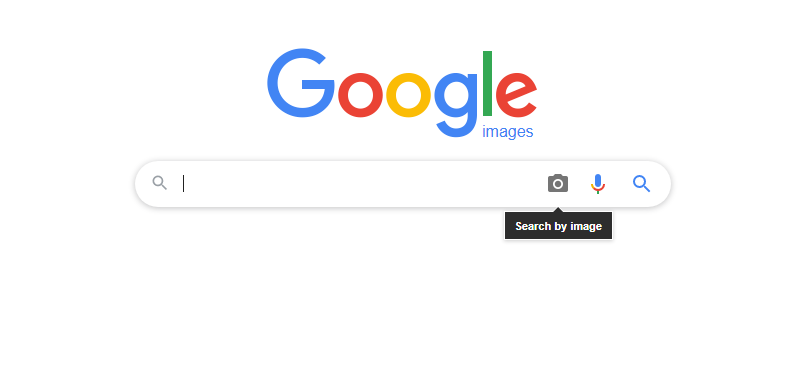
Secondly, open Google images. Go to the right side of the Google search bar and click on the ‘camera’ icon. Upload your image.Google Image Search

However, if you don’t have the image saved, then you can get the URL of an image. Open the Google camera icon once again and paste the URL of the image.

Lastly, click on the search. You will see the uploaded photo along with keywords. Next to the image, Google will tell you whether other sizes of images are available or not.

How to do reverse image search on Google Chrome app on mobile?

Now, let us try reverse image search through the Google Chrome app on mobile. Open Google image search on the Chrome app.

At first, search for your image by typing the image you were looking for. Click enter and a list of photos will appear. Save your desired image.

Now, when you open the image again, long-press it for a few seconds. You will see a drop-down menu with multiple options. One option will be to “search Google for this image”.

image search on Google Chrome app on mobile

Select that option and a new tab will show you where this image is present and its different sizes as well.

How to do reverse image search on Google? (mobile browser)

Open Google images on your web browser. Get rid of the mobile view. To do this, you have to change the website settings to desktop view.

Click the three dots at the end or the top right corner of the browser. Choose the option of “request desktop website”. Now you will see Google as you see it on your computer.image search on Google mobile

image search on Google mobile

Upload an image in the same way you would upload it on your computer. If you have the image saved you can upload it directly and if not then you can paste the URL.

Click on search to explore the results. Google will show you the related searches and also the images available with other sizes. You can check the other websites with the same picture.

How to do reverse image search on Google using iPhone?

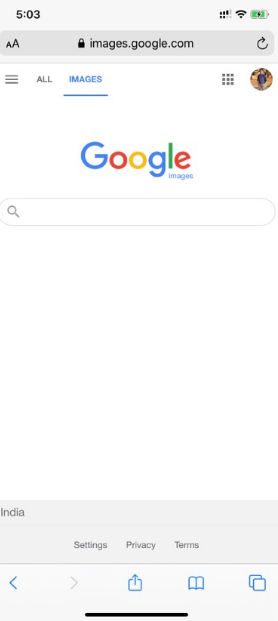
Open the browser and then go to images.google.com. If you are using Safari, click on the ‘AA’ icon on the left.

image search on Google using iPhone

If you are using Chrome, then look at the bottom-right of the screen for the three dots and click on it.

Select “request desktop site” and upload the images in the same way. Click ‘search’ to see the results.

Reverse image search on Bing

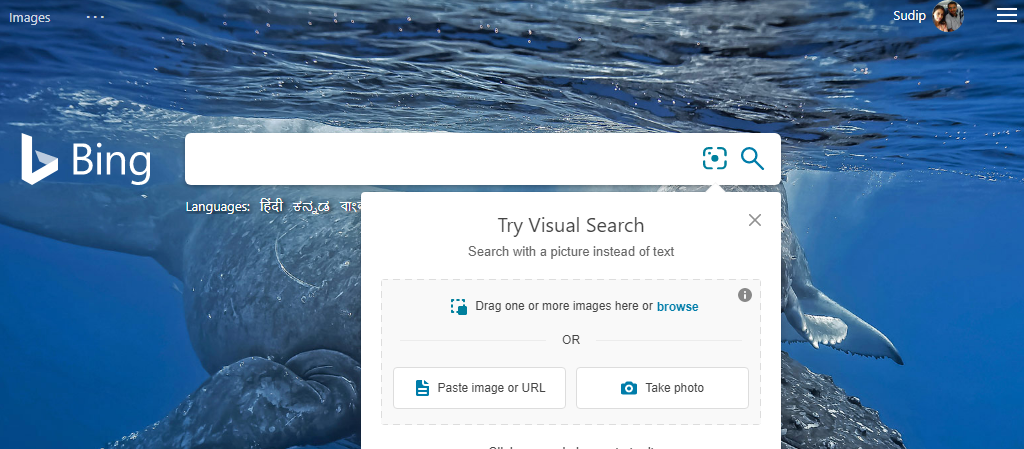
Click on the “images” option on the left-hand side of Bing’s homepage. Choose “search using an image” on the search bar.

image search on Bing

You will get options like drag an image into the search bar, upload images, paste a URL, and take a photo. Unlike Google, in Bing, you can drag more than one image into the search bar.

You can do any of the above-mentioned actions and click on “search”. Click on the tabs to check the pages where the image comes up. You will find similar images and related searches.

How to reverse search for images on Yandex?

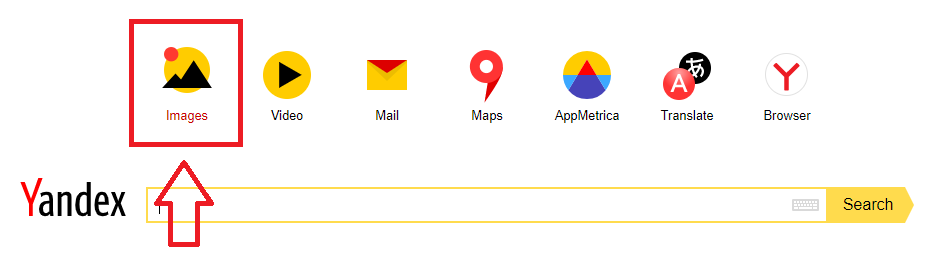
On Yandex, click on the images on the top left corner of the search bar. Then click on the camera icon.

yandex image search

You will have the option to enter the image URL or upload the picture from the desktop. If you decide to save and then upload the images from the desktop, you will find the results with all the available image sizes.

There is a “recognize text” button which will help you in searching or translating the words in the image.

How to perform reverse image search on TinEye?

TinEye is a search engine that offers a quick reverse image search option. Click on the upload button on the left side of the search bar to browse from the desktop’s saved images.

You can also paste the image’s URL into the search bar. You can also drag & drop the image from the browser tab right into the TinEye homepage.

reverse image search on TinEye

The best part is, you can use a filter to search according to the newest or oldest post, image size, best match, and most changed. You will also have the option to filter by domain to get specific results.

In conclusion, it can be said that the reverse image search is easy to do on any mobile or desktop. Be it Mac or PC, Android or iPhone, you can still reap the benefits of it.

However, sometimes the reverse image searches might not work at one go. As a result, even if you upload the photo on the search bar, you will get zero results.

Such incidents happen because the websites prevent the images from getting indexed. Sometimes the data centers could be slightly out of sync. Thus, some users can find the image with reverse image search while others can’t.

How to optimize your Shopify e-commerce store for SEO – A foolproof guide

Businesses have to depend on strategy, planning, and development to ensure long-term success. You cannot deny that online shopping is the new normal these days. Thus, it will take a lot more than just building an e-commerce store to draw more customers. It is time to create a Shopify e-commerce store for SEO.

The search engines have a major role to make your online store visible to shoppers. The higher you rank in the search engine results page, the more sales you can make. Shopify s one of the most preferred e-commerce stores and the use of the CMS platform has doubled since 2017.

Shopify is a very good option to set up an online store because it has got easy backend administration. Thus, you can meet your specific requirements. Most importantly, it comes with a lot of SEO-friendly features.

What to do to optimize your Shopify e-commerce store for success?

A simple website structure

The way you organize the content on the page is important to achieve SEO success. If the shoppers can find your store easily they will stay on it for long. When the shoppers stay in your store for a long time, it says to Google that your site offers value. This increases your ranking on the search engine results page.

On top of that, a well-optimized website structure will make things easier for the Google web crawlers to crawl your website. Therefore, your website structure should be simple. For instance, you can keep the product pages only a few clicks away from the home page. Organized and user-friendly website design will make things easy for the visitor. They can find out what they are looking for.

Also, if the site architecture is interlinked the web crawlers can easily follow the links. Simple site architecture means the link authority will also flow easily from pages with more backlinks to the low-ranking pages. This is specifically useful for SEO and digital marketing purposes.

Get rid of any duplicate content

When there are two similar contents with separate URLs, then it is duplicate content. The page can be either on your website or someone else’s. You have to get rid of it immediately.

Duplicate content on Shopify will have a negative impact on search performance. The search engines are in general tolerant towards site duplication, but if the content of the text is copied from another site, then it will face a Google penalty.

The good news is, once you get rid of the duplicate content, you can increase your website ranking. Check for plagiarism on your website. You can also conduct website audits to find out the pages with similar content and different URLs.

If you have not redesigned a website for a long time, then it is time to update. You can break free from the duplicate content if you can create a new copy.

Conducting a proper keyword research

Researching keywords is the foundation of SEO success. Follow these tips to generate relevant keywords for your store.

  • Export the keywords from Google Ads and then you need to optimize the search terms which generate better revenue and conversion rate.
  • You can also use the Google Search Console for identifying the keywords that have higher impressions and clicks.
  • You can also conduct the SEO competitor analysis using different tools where you can generate the “content gap’ report. This will help you in finding out the keywords that your competitors are using.
  • Finally, you can analyze the buyer persona and track the search forums that are related to your products for topic ideas.

Optimize the product pages

When you have collected a list of keywords, it is now the time to optimize the pages with the chosen ‘search terms’. You can start with the top pages at first, like the home page and the products page.

Optimize the pages by writing Meta titles and descriptions, adding alt-tags for images. Some general guidelines are:

  • Create unique title tags and Meta descriptions for every page.
  • Add a keyword when it is appropriate.
  • Do not use too complicated descriptions and make sure it is within the given character limit.
  • Create an attractive page that will encourage the visitors to click.
  • Make sure that the descriptions are brief yet descriptive.

The descriptions have to be written keeping the users in mind. The best way to add relevance to your content is to share the features and advantages of your products. Adding alt-texts to your images is also a good option.

The Google images are the second largest global search engine. You will be able to drive more traffic to the site through the images. This is why adding alt-text helps in describing what the image is all about.

When you have finished optimizing the titles, meta descriptions, and alt texts, you can now work on creating unique content for your products.

Setting up 301 redirect pages

The 301 redirects tell the search engines that the page is not available and it is moved to a new URL completely. You don’t want the consumers to shift to a competitor’s website once they land on a 404 not found page.

The goal is to lead your visitors to a new page that you can do by creating a URL redirect from the Shopify admin portal. Remember that before you redirect the users to the new URL, you have to delete the existing webpage.

Increase the website speed

If the website loads slowly, it will hurt the rankings. This is why it is important to put an effort to keep the website load speed high. You can use tools like Google Page Speed Insights.

  • You will have limited options on Shopify; however, here are some things that you can try.
  • Choose a theme that loads quickly
  • Compress the images before uploading
  • Install only the apps that you need so that they don’t hamper the site performance.

High-quality backlinks are important

The search engines rely on high-quality backlinks to determine how the community values your site. You can consider the backlinks as the word-of-mouth equivalent of SEO. Better quality backlinks will help you in building credibility and boost the organic traffic for your store. Here are some of the types of backlinks that you can get for your site:

  • Supplier/manufacturer links
  • Competitor links
  • Influencer voices
  • Brand mentions
  • Broken links

Content marketing

There is no doubt that content is the reason your website has visitors. A lot of people might skip content marketing since it will be an e-commerce store on Shopify. But creating content that adds value to the overall user experience is important for your e-commerce store as well.

Publishing informative content like blog posts, articles, questions & answers will help in educating people at different stages. This will also increase the chances of buying from you in the future. Creating content is the best way for people to know your brand without any direct approach. Well-written content can help you rank more keywords and earn more backlinks.

In conclusion, these are the factors that can get your Shopify e-commerce store SEO-ready. To avail the best digital marketing services, get in touch with Skyram Technologies.