Optimize your Google and Facebook Ads with Events – Here is how to use it

To start off if you have a busy website a lot of visitors will be interacting with it. Now the question is are you making the best of the digital marketing campaigns and everything else that is going on with your website? You can make use of every interaction, a pageview or a click can be useful for understanding your audience.

Once you understand your audience, it becomes easier to target them in a much better and smarter way. If you want to make more profit from your paid campaigns on Google and Facebook, you should start using Events. It helps you in tracking the interactions by installing a tracking code on your website.

The best example of an event is the ‘Add to Cart’ option. Another event is filling out of one or more fields in a form and not submitting it. This is also recorded as an event. In simple terms, you can record or track any action that the user makes through Events. It could be as simple as watching a video, clicking a link, or downloading a simple PDF.

How to set up Events on the website

With both Google and Facebook, you will need a code to set up Events on the website.

Firstly, you have to verify that you already have a Facebook Pixel code within the header code of the pages of your website. If you don’t you have to enter the base pixel code before anything.

Now, you have to choose the event that you want to track for a certain page from the event list of Facebook. for instance, if you want to track the “Add to Cart” event, you have to copy the Add to Cart event code.

It looks like this “fbq{‘track’,’AddToCart’}. Copy it and paste it above the tag. You have to repeat this process on multiple if you want to track multiple events.

How to set up Event tracking using Google Analytics?

If you want to get more insights, then you can also use Events in Google Analytics. You have to create custom code snippets for all the events.

The code is added to the link code of every action that you want to track. When you click on it, the item gets displayed on Google Analytics. The event code is made up of four elements. They are as follows:

  • Category – it defines the group of action you want to track
  • Action – The type of action you want to track
  • Label – it helps in monitoring and states what the event is all about
  • Value – This is just assigning a simple numeric value to the event. It can be a monetary value or a scale.

The basic structure will look like:

onclick=”ga(‘send’, ‘event’, ‘Category’, ‘Action’, ‘Label’, ‘Value’);”

The code needs to be added within the href link code before the link text, which looks like this:

Download Our Brochure

There is no value assigned to the event. Now, is there a better way to do this? Yes, there is. you can use tools like Oribi that tracks every interaction of a website.

It will collect all the data and present it to you. Even if you make certain changes like adding pages or changing buttons, the events get updated. The best part is, all this is done without any coding.

How to use Event data for optimizing paid campaigns?

You can use all the data to optimize the paid campaigns. There are two objectives of tracking event data. They are:

  • Internal – where you can analyze how the visitors are interacting with the website
  • External – where you export the data to the paid campaigns to categorize them in a better way

Consider the “Add to Cart” event. The visitors didn’t buy, however, they showed interest. this is worth the effort. Every user is different. Now, to make sure they purchase in the future, you can, for instance, create a category for the visitors who added a shirt and a category for visitors who added a shoe. This categorical customized will help you in your paid campaigns.

Both Google and Facebook offer strong optimization features for the paid ad campaigns. The reasons behind this are:

  • It helps to segment your audience and deliver a relevant message
  • It helps in reaching new audiences that are related to your offers

Google’s Remarketing and Facebook’s Retargeting

The objective of both of them is the same. In layman’s terms, when you visit a website, a tracking cookie gets installed on the browser when you accept the cookie message. When you leave the website, you get to see the display ads from the website. This is what Google remarketing is.

This is very effective because it compels you to stop scrolling and think about the website or the product once again. If you click on the ad, it will take you back to the website and the product once again.

Google’s Similar Audience and Facebook’s Lookalike

Based on the characteristics of your audience, Google and Facebook can target similar people and show your ads to them. But how do Google and Facebook do that? The algorithm locates their interests, location, demography, and professional background.

For instance, your audience takes action; it is recorded as an event. Now, once you define the visitors, the algorithm finds similar visitors who took similar action and shows your ads to them. This is a great tool to expand the potential audience and reach more people.

The complete process includes three steps:

  • Identify the events and insert proper codes for all pages and event types.
  • The way you define an event is important for the success of the ad campaign.
  • When you set up the event you have to enable Facebook and Google to use the data collected from Event tracking.

Using Facebook Event tracking for ad optimization

Once you insert the event tracking code to different pages of the website, the event data becomes available to the Ads Manager.

  • Now, to locate the data, log in to the Ads Manager, click on the Pixels tab
  • Choose the ‘data sources’ on the left
  • It will take you to Pixel and you will see the generic breakdown of events
  • Now, click on the ‘details’ tab
  • Here you can see the breakdown of events by date and volume.

Now you can categorize the visitors by their actions.

Using Event tracking for Google Analytics and AdSense

The first step is to define the events in Google Analytics.

  • Click on the ‘Admin’ tab and then click on the ‘goals’ tab.
  • Choose the ‘new goal’ option
  • Now, click on the ‘custom’ option
  • Name your goal
  • Select ‘event’
  • Now, you have to refer to the four elements that you defined in the event code “onclick=”ga(‘send’, ‘event’, ‘Category’, ‘Action’, ‘Label’, ‘Value’);”. There will be a specific box of each value.
  • Remember that the text you enter should be identical to the text in the code. If it is not, the event will not be recorded.

Repeat this process for every event tracking.

Now, you have to import the event in Google Ads.

  • Click on the ‘tools’ tab present at the top navigation bar and choose ‘conversions’ from the dropdown menu.
  • On the left side, click on ‘Google Analytics’
  • There is a list of existing goals in Analytics.
  • Choose the ones that you want to import

That’s it. The events you track will be available for segmenting.

In conclusion, it can be said that the Event tracking helps you with valuable data on the website visitors like specific interests, level of intent, and place in the funnel. Using this data, when you optimize your paid ad campaigns, you can better engage your audience, increase conversion, and generate more ROI.
5 Reasons to Choose Brand Influencers over Bollywood Celebrities

To start off, it is true that digital marketers and brands have always relied on Bollywood celebrities from time to time for endorsements, increasing brand awareness, recognition, and boost sales. However, a lot of things have changed in the last year. At present, the major brands want to collaborate more with social media influencers instead of traditional Bollywood celebrities.

What is the reason behind this sudden change?

Well, Sushant Singh Rajput’s untimely demise has played a vital role in this. How? Yes, we shall get into it. Firstly, with the increase in popularity of TikTok and other video making applications, there has been an increase in the number of social media influencers.

Major brands started connecting with TikTokers, Instagrammers, YouTubers, admins of Facebook pages, people with a large number of Twitter followers. The reason behind this was, a single post or video from these people would bring a lot of visitors, increase conversions and profits to these brands.

These people with so many followers have the capability to drive sales. This is not something an expanding brand can ignore. Now, this was an emerging trend where companies and brands were drifting towards the influencers. However, with the death of Sushant Singh Rajput, there was a whole new momentum in this emerging phenomenon.

What is the effect of this sudden shift in mindset?

With the ongoing CBI investigation on Sushant Singh Rajput’s death, there have been numerous speculations and assumptions among a lot of people. There is no final verdict as of yet. However, all this has resulted in a strong hatred towards a large segment of major Bollywood celebrities.

The list of Bollywood celebrities who people have started hating is really long. It specifically includes Mahesh Bhatt, Alia Bhatt, Salman Khan, Karan Johar, Amir Khan, Sonam Kapoor, Sonakshi Sinha, Jhanvi Kapoor, and the list will go on.

Not only are these people hated, but most of these celebrities had to deactivate their social media accounts. The scenario became such that even their movies are getting 1.1 ratings at IMDB (specifically speaking Sadak 2, released on 28th August 2020).

A lot of Bollywood celebrities have lost a large number of followers on their social media accounts. To sum up, the B-town celebs are facing the wrath of the common people. It’s like there is an anti-Bollywood campaign going on. Amidst this scenario, the brands associated with them are also getting severely affected.

People are losing interest in using the products of the brands endorsed by these celebrities. Thus, in the Indian market, a lot of brands are losing customers. With this effect, it has become critical for the brands to drop the celebrities and instead opt for the influencers.

Now, let us check a few other reasons why it is better to opt for brand influencers instead of celebrities.

Why should you choose the brand influencers and not celebs anymore?

Purchasing power

Brand influencers have more power to drive purchases, increase sales, and increase conversion. According to a recent survey of 14,000 consumers in the USA, it was seen that brand influencers are more effective in driving sales.

A report from ZD Net mentioned that 30% of the consumers are more likely to purchase products endorsed by a social media influencer or a blogger than a celebrity. 70% of the Millenials prefer “peer” endorsements instead of recommendations from traditional celebrities.

Social media influencers appeal more to the Millenials

As we mentioned above, most of the Millenials grew up in the digital age. This is why the demography of young consumers prefers influencers more. They trust them.

73% of the young teens and Millenials connect to the YouTubers. They are more likely to try a product recommended by a YouTuber. On the other hand, less than 50% of them would try out a product recommended by celebrities.

Women don’t trust celebrities

With the uprising of more trusted reviews from digital influencers, female consumers don’t trust celebrity endorsements and traditional advertisements. In a survey of 1500 women, 86% of them trusted products and reviews offered by “real people”. 58% of the women said that they learn more about the products from reviews offered by YouTubers and social media influencers.

Brand influencers are much more relatable

Simply put, they connect more with the common people. Without the support and preference of the common people, no brand can exist in the market. Thus, with the increasing number of followers for the social media influencers brands are more inclined to connect with them.

In a survey of more than 500 marketing professionals, 80% of the marketing executives mentioned that they work with brand influencers. Also, the poll claimed that the majority of them prefer working with social media stars instead of collaborating with sports stars, actors, musicians, and models.

Who wins the ball game? Brand influencers or celebrities?

Since more brands are choosing to collaborate with the digital influencers, the marketers are seeing a shift in the preference of the consumers. The choice of brands, products, and lifestyle has changed.

At present, almost 60% of the fashion and beauty brands already have an influencer marketing strategy in place. There is no doubt that the celebrities that used to influence the purchasing decisions are now taking a backseat.

Unlike traditional celebrities, who are more aloof to the common people, the social media influencers are more of a “regular people”. That makes them more accessible to people. Most of the popular YouTubers, Instagrammers, and other social media influencers still work regular jobs. Followers can relate to that.

Yes, the celebrities do have a large number of followers but the digital influencers have a dedicated audience. They interact more often with their audience and engage them more with their content.

Finally, for the brands that are looking to capitalize on the visibility and appeal through influencers, it is important to opt for influencer marketing with viable advertising channels and accurate marketing campaign strategies.

How to Use Google Data Studio – A complete beginner’s guide

If you ask someone how did they get their digital marketing reports done in such an organized way, the answer will be simple – Google Data Studio! It comes with a wide array of Google essentials and more powerful data sources.

Google Data Studio compiles a wide array of sources for data reporting and analysis. You will get Google Drive files, option to filter data, report pages, create charts, and do more edits from the dashboards.

Google Data Studio is free. As your client base continues to grow, you will need more sophistication on the reports. Introduced in 2016, Google Data Studio brings all your data sources into one reporting experience.

In this blog today, we are going to share the complete details on how to use the Google Data Studio. There are certain areas that you have to learn. These areas will make sure that your Google Data Studio is a successful one. These areas include:

  • Using the right template
  • Connecting the proper data sources
  • Selecting the right metrics
  • Sharing reports

How to use the templates of Google Data Studio?

This is the first thing to do while using GDS. You have to choose a template from the wide range of templates offered by Google Data Studio. If you are new, then it is important to choose the ones based on the type of data you will show.

You can customize fonts and create a consistent report with multiple pages. Since every client has different requirements, the presentation of reports should also be different. The best way is to create templates based on SEO, PPC, and paid social.

This will help you to customize them according to the client’s needs.

How to add the data sources?

Connecting the data sources is very important to create a great report. There is a myriad of connectors in GDS. When you use the connectors, it will take away the manual tasks and sync all data for you.

You can add the data sources at the beginning of the report of you can add them later on. You will find them in the “Add Data” toolbar. However, there are a lot of third-party connectors as well.

But the problem is, the third-party connectors come with additional cost, slows down a report and sometimes the metrics are deprecated.

How to choose the metrics that matter?

Metrics are important because your clients would not want to see a data dump. However, this doesn’t mean that you should use all of them. Use the ones that are needed.

For instance, if you want to improve your brand awareness, then you have to include pre-click metrics like clicks, impressions, view rate, CTR, and more.

using proper metrics and insights on goals, it will show the client that they are getting what they want. This is a win-win scenario!

Sharing the reports

When it is time for reporting and analysis, make sure to review the settings. You will get the following options:

  • Inviting by email (the user should have a Google account linked with the email). You can assign the user to “view” or “edit” permissions.
  • Anyone with the report link will be able to view the report.

Another cool feature is the option to limit sharing. This will do the following:

  • Prevent editors from changing access and add new people
  • Disable any download, view, or copy for the viewers.

How can you build and edit a report?

Let us guide you to build a report in Google Data Studio. The first thing to do is to choose the proper visuals.

Go to the toolbar and click on “insert”. You will have a wide array of options like Time series, Pie chart, Bar chart, Scorecards, Tables, and more.

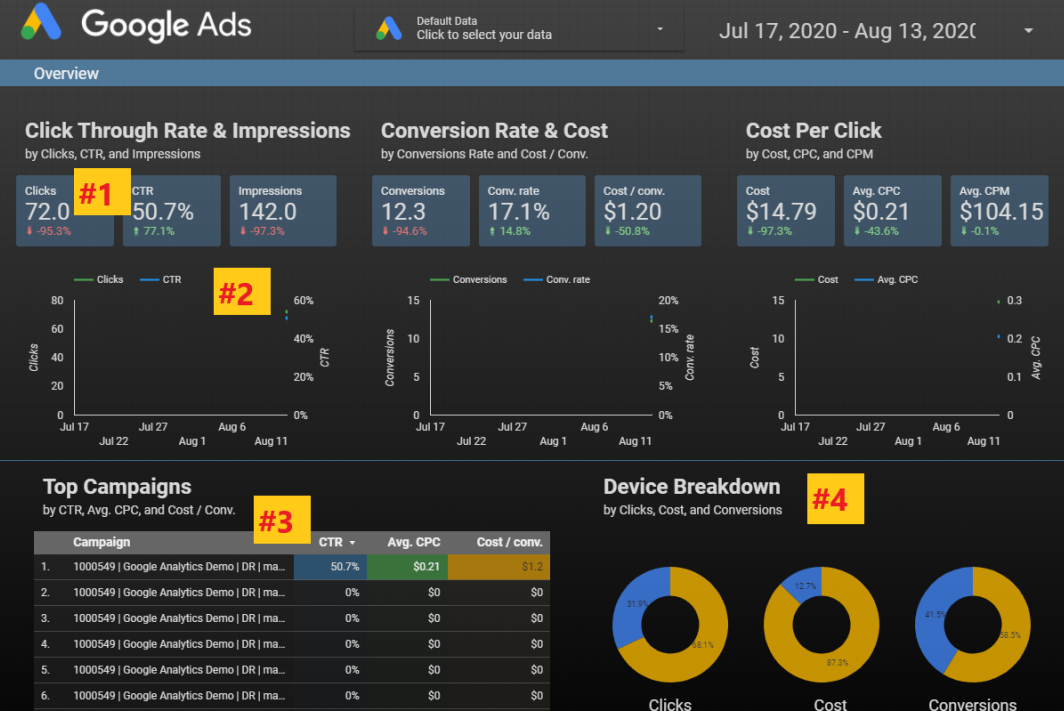
Let us consider four segments of a Google Ads template.

report in Google Data Studio
Source

The first one is the Scorecard section. It shows a single metric taken from a data source. Depending on the source, you can choose multiple options like CTR, clicks, and impressions. It will also show the comparison changes.

The next is the time series. It will show you the change in clicks and CTR over a pre-set period of time.

The third segment is the table which allows you in drilling down the campaigns, ad groups, and customizes the metrics.

The fourth one is the Pie Chart. This is another tool to showcase comparisons between different data points like clicks, conversions, costs, and more.

All these features can help you in customizing the look of the report.

How to edit data formats?

This is how you change the look and feel of the report. For editing the format and style of visualization, you have to select a scorecard.

On your right, you will find the Google Data Studio editing panel. You can change fonts, background colors, change the comparison, and metric colors, text padding to align it left, right, or center.

If you want to select all the scorecards at once, select all of them at the same time. This is how you apply the style changes to all of the selected scorecards.

How to add report filters?

The best way to group multiple visualizations is by adding reports and page filters. For instance, if you want to change the tables and charts while editing the data range, all you have to do is all a data range icon.

Thus, even if the report is compromised, whenever the data range is updated, all the chart data is updated along with it.

If you want to get into the Device Type performance, there is also a filter for that. Go to “insert” then click on “filter control” and add the dimension of the “device” as a filter.

Even if you want to review the data by network type of Search or Display or YouTube, there is also a filter for that. Choose the Advertising Channel Type as the dimension while adding the filter.

Then there is the dashboard that gives you an overview of the website traffic, conversions trending, user behavior trending, device-specific conversions, and traffic, and more. You can check the PPC campaign performances, and search term reports.

In conclusion, it can be said Google Data Studio is currently the best way for creating reports and analytics. This introduction will help you in creating a customized and detailed report for your clients.

SaaS Marketing: Generate high-quality leads for brand awareness

The way people buy things these days have changed a lot. At present, the customers are not swayed away by the flashy advertisements on digital marketing. Instead, the focus has shifted towards more online research and then buying things. Did you know that 57% of the customers these days do online research before buying?

What this means is, you have to focus more on creating a proper lead generation strategy. It is true that successful pipeline marketing varies through different industries and product types. However, for software-as-a-service organizations (SaaS), there are numerous SaaS marketing strategies that have proved to be effective over time.

In this blog today, we are going to share the best and most effective ways to generate leads with SaaS marketing. Here is what you need to do.

What are the differences between the present and previous marketing process?

One of the primary differences between the previous and present marketing planning process is the funnel has changed. In the old funnels, the marketers needed to create a top of funnel awareness campaigns. Without this, the consumers cannot discover the brands.

But after that, websites like Yelp and Amazon started growing by collecting people’s reviews on a certain product. Now, things have changed a lot. You can choose your own brands, evaluate the options, and be much more aware of what is available and what is not.

Now the challenge is to adapt to this reality. So how can SaaS marketers make the best of the present situation? Here is how you can change things.

Prioritize the brand more than your website

Remember that the brand is more important than your website. It is not like that the website doesn’t matter. The difference is, more brand awareness will increase website visitors and traffic automatically.

The bottom funnel websites don’t rank anymore. Let us share an example. If you do a quick search with a B2B keyword “best day trading software”, you will see there are four ads above the fold.

The CTR will not vary a lot from the fourth to the first spot. The CPC will be ok. The third-party review sites and SERP features are lower down.

Now, for a B2B query of “best accounting software”, the SERP features come up at the top, then there are ads and then other review sites.

The point is the way search engines work now, has changed. It’s not that a website has a bad SEO or something. The consumers, these days are more interested in checking out what other people have to say. Whether they buy a $5 burrito or a $2000 software.

Thus, Google has decided to put the searcher first. Thus, if you are not coming up in those queries, you will miss out on 30% of the market share.

Whether it is an On-Page SEO, Off-Page SEO, or Local SEO, it is no longer about getting your website to rank. It is more about customer perception.

Also, some third-party review sites are bidding which is driving up the CPC and reducing the profitability. The new reality is, you have to be aware of it.

Consider the organic CTR

Most of the SaaS marketers use Google Ad services but that is not the best option. The average CTR on Google Ads is 2-4%. The better option is to avail organic CTR is to list on a third-party website.

If you can place your brand in a strong spot you can grab the first spot and increase 32% of the market share. It improves discoverability which is very important to drive marketing qualified leads (MQLs).

A lot of SaaS companies feel that the lower the CPA (cost per acquisition) the better it is. So what they do is stop bidding on the most expensive terms. But, remember that sometimes the most expensive terms are also the most valuable terms.

Even though a lot of third-party sites have higher CPCs, they also have better close rates and cost per opportunity. Thus, they are getting more qualified leads.

The financial model in SaaS Marketing

How you decide to allocate the funds is a very important part of SaaS marketing. Follow the LTV: CAC modeling. There are two types of it. One is the LTV: CAC SaaS non-trial and the other is LTV: CAC SaaS free trial.

LTV: CAC SaaS non-trial

If you are a SaaS firm and you are not offering a free trial, then you will need a proper spreadsheet and budget template to figure out different scenarios.

Look at all the channels in real-time. It will help you in putting all the numbers. Calculate them and run through different scenarios. This will help you in making a better alignment with CFO and build trust with CMO.

LTV: CAC SaaS free trial

If you offer a free trial then you can use a simple model where you will see the team costs, software costs, ad expenses, customer requirements, and more.

It will compute the LTV: CAC ratio and the number of months to recover. Use this as a log to forecast the budget.

Validated Tactics

Do not miss out on the validated tactics that include:

  • Google Ads
  • LinkedIn
  • Podcasts
  • Review Sites
  • Sponsored Webinars
  • Terminus

Organic Tactics

  • Content
  • SEO
  • Partner Marketing
  • PR

Make sure that anyone in your team can get into the marketing platform and get the data they need.

Next is, focus on OCT (Offline Conversion Tracking). You can do this by integrating SalesForce into Google Ads. You can now trust the Google Smart Bidding.

Smart Broad Campaigns

You have to trust Google’s Search engine but after you integrate SalesForce with OCT, run broad keywords. It is important to manage your account daily.

Conversation Ads

With conversation ads, the advertisers can start a conversion with professionals and decision-makers of a business through LinkedIn Messaging. You can use it to book a discovery call or use it to gift an offer and a lot more.

Content Marketing

Content writing and marketing is tough for those SaaS companies that don’t have a recognized brand. If there is no distribution plan, then it is better not to create content. You have to find a promotional strategy for it. PR will be tough because you have to be a guest. Instead of doing all this, you can opt for:

  • Sour interviews
  • Friday Roundtables
  • SaaS marketing competition

This is a better content marketing campaign.

In the end, it is important to remember that whether it is digital marketing or SaaS marketing, everything starts with your team. You have to create a culture where your team can submit new ideas and new marketing models.

5 simple steps to create a search engine optimized FAQ page

There is no doubt that FAQ’s help in increasing the search engine rankings because Google values your website for the data you offer. Search engines and people love the FAQ pages. Why? Because these pages show that you care for your customers.

With a great FAQ landing page, you can increase your customer experience. Also, your online visibility will increase People will also find you outside of your website. You can directly respond to the needs of your target audience.

This is also another reason why voice search is becoming so much popular these days. FAQ content can generate a wide range of targeted traffic to your website. In a lot of cases, business owners use it as a good content marketing strategy.

In this blog today, we are going to share the 5 simple steps to create a well-optimized FAQ page for search engines.

  1. Creating an SEO-driven strategy

While making an SEO strategy, it is important to identify the important search trends. You have to know how your customers are framing their questions. Find out which questions are most interesting to them and which are more popular than others.

Start with semantic research with a text optimizer tool to find out the related concepts behind any search query. This will make things easy for you. You can understand the customer search patterns, break questions, and create more subtopics.

While you type on the Google search bar, do not forget to check the Google-Suggest section. This will give you a lot of suggestions. You can use Ahrefs to get more questions from Google-Suggest results. An easy way is to use the filters to find the most popular questions. Then you can create similar topics and follow similar search patterns.

Also, make use of Google’s ‘People Also Ask’ feature. This is a good source to collect information on important search queries. Did you know that your competitor can be a good source of information? Run your competitor’s FAQ URL through the tools to see which questions can generate more organic visibility.

  1. Organizing the questions

This is a very important step. The tools will offer you a lot of data to work with. However, not all the questions will be worth using in your website’s FAQ section. Thus, you have to organize them. Use spreadsheets to note down the queries according to their dates.

The goal is to find out the following:

  • The main subtopics behind the questions. It could be related to price, DIY, or any general questions.
  • You can also opt for the closely related questions. However, make sure that you don’t clutter the FAQ pages by answering the same questions.
  • Use questions that match the various content personas. You can create templates where you can attribute search queries for identified content personas.
  • Question groups with similar search intent that will help your audience to learn more about a topic. Questions that might lead to a purchase and questions that are similar to your brand or your competitor’s brand.

These will help you in formatting your FAQ pages into the sections and it will increase visibility. A well-structured FAQ page increases visibility. Also, there are some WordPress plugins that can help you in organizing your FAQ page in different sections.

  1. Using the FAQ page schema

The Google snippets depend mostly on the use of so-called schema or the structured markup that help the search engines in extracting the necessary information. For the FAQ rich snippets, there is a structured markup which is called FAQPage schema.

To make things easier, choose a proper website development service and install a WordPress Plugin that will help you in using the schema on any of the pages. With the plugin installed, when uploading any of your content to the WordPress, you can select the ‘IMN FAQ Block’ to markup questions and answer with the FAQ Page schema.

Another good thing about this plugin is, it prompts you in marking up each question with H2 or H3 subheading. This is what Google uses to find answers for questions inside the People Also Ask feature. By using this plugin, you can optimize for both organic search opportunities.

  1. Adding internal links inside every answer

This is a very important step for the search engine optimization that is overlooked a lot of times. Google will show your answers inside the rich snippet, yet they will appear so conclusive that the searchers will never click to the site.

To avoid this problem, you can add internal links in every answer. You can see these in-answer links in the organic search so that the searchers might be more inclined to click on them.

  1. Creating a clickable table of contents

To make the FAQ page easier to navigate for your audience, you can publish a summary of the major sections. This will be like a table of contents. If you did step 2 successfully and created a structure on the actual searching pattern, this will give you another organic search advantage.

These are like “jump-to” links which will take the searchers to the part of the FAQ page that they find interesting. A well-organized FAQ page that includes a clickable table of content will make the page easy to navigate.

Highlight the TOC in the left column so that the questions are highlighted. To get this done, you have to create an anchor link for every question. In the TOC, you hyperlink every question to the corresponding anchor link.

In conclusion, it can be said that Google is always coming up with new sections and elements. This helps in creating better, information-rich, and more interactive search results. If you can maintain a flexible SEO plan and adapt your tactics to the newest changes, you will experience better organic search visibility.

Getting more organic opportunities is easy with a well-structured and well-optimized FAQ section. This will help you in achieving many more goals due to better user engagement and more conversions.

A guide to choosing the 7 Google tools for keyword research and SEO

There is no doubt that consumer behavior is changing at a fast pace, especially with the ongoing COVID-19 pandemic. Thus, it has become more important than ever to do proper research on the keywords. This will help you in understanding the latest shifts in the consumer intent.

Most of the SEO professionals know how to find out insights from the Google Search Console. They know which keywords have helped them in getting more traffic, increase rankings, and enhance visibility in the past. However, it is time to think outside the box.

Thus, you have to find out the resources that didn’t exist before March 11, 2020. In this blog today, we are going to tell you about the 7 Google tools. These tools will help you in your keyword research and SEO.

1. Rising Retail Categories

In May 2020, Google launched a brand new and interactive tool which is known as Rising Retail Categories. This tool helps us in understanding the following;

  • The rising retail categories in Google Search
  • The locations where the searches are increasing
  • The associated queries

For instance, in the last 6 months, the top trending searches in the US have been sprinkler control, sneeze guards, neck gaiters, household disinfectants, and protective masks. In this way, you can focus on the top trending categories month-to-month. If you are making any of these products, then it is time to look for the key trends. Trust me; you will become a hero in the retail market sector overnight.

2. Coronavirus search trends

There has been a massive spike in the search topics related to coronavirus, COVID-19. This has been an ongoing trend from February to May. After that, the search interest in coronavirus has reduced and come below weather searches. However, it still remains above the search topics of music and sports.

3. The US economy and Covid-19

Google has recently created a section of the Coronavirus Search Trends on the US economy and COVID-19. This includes analysis of how the Coronavirus has affected the searches and comparing them with the past searches.

If you keep scrolling down, you will see the search interest in the recession since 2004. If you further scroll down, you will see the spikes in different search interests in other terms like unemployment benefits, food banks, mortgage forbearance, food stamps, and more.

You can check the map of the country to see which search terms are used the most in which locations.

4. Shopping insights

In October 2015, Google launched the Shopping Insights feature. This is a very useful feature as it helps you to see how your clients or company stack up against your competitors. It will help you track the competing products in your category.

This is a life-saving feature, especially in these extraordinary times. There is no doubt that this year’s disruptions are making it tough for retailers to do business. Here is where the benefits of Shopping Insights come in.

The Shopping Insights help in staying updated on what the shopper wants. Thus, you can follow the trends in their category. Now, the question is, how does Google provide the shopping insights? According to Think with Google, 63% of the shopping scenarios include shoppers doing online research before purchasing.

Doesn’t matter whether they shop online or offline, the research before shopping is done online. Thus, with daily search data for more than 55,000 products, 45,000 brands, and 5000 categories, the Shopping Insights will help in understanding the customers in a better way. Once you get to know their intent, you can make more informed decisions throughout both online and offline channels.

5. Market Finder

In November 2017, Google launched Market Finder. It has become a game-changer while helping clients in navigating through the present scenario. When you enter the URL of any organization in the Market Finder, you will be able to calculate the regions that offer the best opportunities for similar services depending on the key metrics/filters of your chosen categories.

For instance, if it is a school or university, it will show you all the regions that offer the best growth and career opportunities. This is a significant surprise because it comes as a shift from the geographic trends before the pandemic.

6. Google Surveys

Google Consumer Surveys was launched in the year 2012. It got renamed as Google Surveys in 2016. At present, it has become one of the most essential tools to get valuable insights on the target audiences. This is a market research tool that gathers data from the survey questions you use.

The web users answer your survey questions for accessing high-quality content on the Google Display Network. In return for it, the publishers get paid for it because their users answer the questions. Google then compiles and analyzes the answers through a simple online interface.

Yes, you can use the Search Console but they will not tell you “why” people are using those queries. This is why you should use Google Surveys. Google surveys help in uncovering the search intent. This is much more valuable.

Google Surveys will help you get answers much more quickly. And the best part is, it is cheap. The prices start at $0.10 per complete survey. Keyword research will help in choosing a keyword phrase for optimizing the title and Meta description of a landing page.

Google Surveys help in ensuring that the content on the landing page is optimized to address the consumer intent. This is important because you can do much more than generating organic search traffic. Different SEO strategies can help you in generating organic search traffic which converts leads.

7. Google Trends

Google Trends was launched in 2005 and this is why it is the oldest tool. A lot of SEO professionals don’t use it too often because it doesn’t offer any data on the organic search volumes. However, these are not normal times. Finding insights that can be processed within a very short time after it happened in the real world, is something that will get the SEO professionals a competitive edge. The worldwide keyword search terms with “best” and “cheap” have increased steadily in the last 16 and a half years.

It is important to create and optimize new content using these keywords because that is what your customers are searching for. Thus, on one hand, the COVID-19 crisis represents a threat and an opportunity too. Thus, you don’t have to use traditional tools for digital marketing.

Creating an HTML form that sends email responses to your inbox

Yes, it is true that improving the UX of a website will cost a lot of money. Also, you don’t need to spend a lot of money every time you face a problem with your website. There are simple fixes.

The question is, how can you find out if your target audience is enjoying the website experience? The answer is very simple. All you have to do is have HTML forms on your website.

This is a great way to get customer feedback about their experience. These forms will offer you insights on how to improve the website UX for more conversions in the future.

Did you know that 74% of the marketers make use of the forms to get more leads? Whether you want to convert more visitors to leads, gather information for the sales team, or want to create solid brand awareness, the forms can help you in a lot more ways than you can think of.

Therefore, in this blog today, we are going to help you in creating HTML forms that send email responses. However, it is not that simple. It will depend on how you work and on what platform you are working with.

If you are only working on HTML then it is pretty easy. Here is a sample code:

“

method=”POST”

enctype=”multipart/form-data”

name=”EmailTestForm”>

Name:


Message:


“

This will create a form like this:

basic HTML form
basic HTML form

This is a basic HTML form. However, the problem is, it doesn’t send the feedback directly to an email. Instead, the HTML code opens an email client window to submit the form.

The problems of email forms in HTML

The reason why browsers don’t allow submitting forms directly to an email address is sending emails directly from an HTML web form that will reveal the visitors’ email address. Thus, the visitor will become vulnerable to malicious activities like phishing.

An HTML code activates the default mail client on the user’s computer. The web browser sends a request to the email service provider and not to the specific address.

The HTML code needs a JavaScript to validate the form and PHP coding for communicating with your email server and send the content to a mailbox. The following three sets of code will get your job done.

HTML:

“

Your Name: Email Address:

Message:

“

JavaScript:

“

“

PHP:

“

$errors = ”;

$myemail = ‘yourname@website.com’;//<—–Put Your email address here. if(empty($_POST[‘name’]) ||

empty($_POST[’email’]) ||

empty($_POST[‘message’]))

{

$errors .= “n Error: all fields are required”;

}

$name = $_POST[‘name’];

$email_address = $_POST[’email’];

$message = $_POST[‘message’];

if (!preg_match(

“/^[_a-z0-9-]+(.[_a-z0-9-]+)*@[a-z0-9-]+(.[a-z0-9-]+)*(.[a-z]{2,3})$/i”, $email_address))

{

$errors .= “n Error: Invalid email address”;

}

if( empty($errors))

{

$to = $myemail;

$email_subject = “Contact form submission: $name”;

$email_body = “You have received a new message. “.

” Here are the details:n Name: $name n “.

“Email: $email_addressn Message n $message”;

$headers = “From: $myemailn”;

$headers .= “Reply-To: $email_address”;

mail($to,$email_subject,$email_body,$headers);

//redirect to the ‘thank you’ page

header(‘Location: contact-form-thank-you.html’);

}

?>

“

How to create an HTML form that emails the responses to the mailbox?

Now, the above-mentioned codes are not difficult but it will take a lot of time for you. If you don’t want to use so many codes, then the following options will get the job done.

Form plugins for WordPress

WordPress brings you a lot of paid and free plugins for you to work on. With these plugins, you can create multiple forms that perform correctly.

Ninja Forms: These are perfect for beginners. You can create custom forms, modify each field, and then save them for later. If you need to indicate required fields or custom input masks for international phone numbers, then this one can do it for you. Also, you can even add your own raw HTML to include videos or custom graphics to increase branding. Ninja forms also help you in avoiding spams through Google reCaptcha, honeypot options, and more.

WP Forms: It includes a user-friendly interface along with a drag-and-drop builder for creating beautiful and functional forms. You can use the free Lite version or you can opt for the paid version as well. The conditional smart logic allows you to choose whether or not to display the additional fields depending on the previous answers.

Also, WPForms securely integrates with multiple payment options like Stripe, PayPal, and more. Thus, it is perfectly suitable for e-commerce applications. You can use the WPForms for developing your email list.

Gravity Forms: Gravity Forms help a lot in saving time. The interface is simple, easy to use, and integrates with numerous popular services like Paypal, Slack, Zapier, Campaign Monitor, and Stripe. There are 30 premade customizable templates that will help you get started.

You can use the conditional logic technology for creating dynamic entry fields depending on answers to different questions. Gravity Forms are committed to responsive design. The forms look perfect on every device. Also, Gravity Forms will send a notification with every submission.

Shopify form Apps

Shopify offers its own series of applications that will help in creating a form and send email responses.

Using the Hulk Apps Easy to Advance Form Builder, you can use premade templates or design your own forms for multiple purposes. You can use them for getting leads. collect payments and also manage customers.

You can create HTML forms that email multiple addresses along with notifications. Also, you can design completely responsive forms for free.

Also, you can use the form builder for custom forms using AAAeCommerce Inc. You can use the easy drag-and-drop builder for creating mobile-responsive forms. You get a lot of similar features like the WP plugins integrated with email apps and PayPal. If you want to create an HTML form that will send responses to an email, you can choose multiple recipients with this.

Google Form

With the Google Forms, you will be able to create beautiful surveys for your email marketing campaigns. Since it is through Google, you and your team can easily collaborate.

The best thing about Google Forms is, you can upload logos, graphics and the website builder will choose the right color to match. The forms are mobile responsive. Also, Google will change them into real-time charts and graphs.

In conclusion, it can be said that user feedbacks are very important in web development, designing, and digital marketing. You will find it very hard to create a strictly HTML form that submits to an email. The technology will not communicate with an email server. However, you can use the HTML form that emails responses by using JavaScript and PHP. Also, you can opt for the user-friendly drag-and-drop plugins.

Creating a Comprehensive PPC Report Using Google Data Studio

There is no denying the fact that PPC reports are very important if you offer paid advertising services. But creating them can take a lot of time. And if you have to cover different systems like Google Ads, Facebook Ads, and Bing Ads altogether, then it becomes tougher.

It is not possible to do them manually. However, thanks to the Google Data Studio, you don’t have to put much manual labor in it. In this blog today, we shall share how to create an automated Google Data Studio PPC report. You will also find the shortcuts to the consolidated reporting.

Before we start with the automatic PPC reports in Google Data Studio, let us share a brief history of the evolution of Google Data Studio.

A brief history of the evolution of PPC reporting

First of all, you have to know that PPC reports are the most important if you offer PPC services. Your clients will see these reports as the results sheet of the ad campaigns.

When the PPC reporting started initially it had a screenshot combined with a verbal report. For instance, “your campaigns had 170 clicks 14,521 impressions and .66% conversion rate. That’s it. Clearly, this is not very insightful.

Then came the use of excel charts. It was simple. Copy all the data from Google AdWords and Microsoft and then paste it into a spreadsheet. Then you could create manual charts as well.

Then came the automated PPC reporting version 1.0. It started with Excel and then continued with Microsoft Access. Eventually, a proprietary reporting system was developed using an SQL server. The final result was mostly the same.

Next, people shifted to creating a data warehouse for the marketing reports. This is very much time consuming and you have to spend quite a lot of money. It doesn’t make reporting easier.

Introduction of Google Data Studio – the best option for PPC reporting

Finally, Google Data Studio gets introduced to third-party data connectors. We already know that it is free. Also, no doubt it is one of the most sophisticated reporting systems that anyone can use.

Because it doesn’t have any fancy coding or costly data warehouses. All you need to do is connect the data studio to the marketing platforms and you will be able to build a live dashboard. This dashboard automatically reports the latest results.

With the ability to connect with more than 30 advertising platforms using Supermetrics, you will be able to report on Facebook, Google, Bing Ads. Yes, it is true that Google Data Studio comes with its own quirks, especially with third-party connections. But till now it is the best option for creating monthly PPC reporting.

How to use Google Data Studio for monthly PPC reporting?

  1. Start with whiteboarding

Start with analog and whiteboard it out. The best way is to just jump into the Data Studio and then start building. If you start working with the charts and graphs in the Data Studio, it will take a lot of time. Whiteboarding is the simplest way to get the report concept in place.

  1. Add the tools

Yes, Data Studio is the primary tool but sometimes one tool is not enough. Supermetrics is the additional tool you need. This will help you in creating an all-in-one PPC report.

Supermetrics will connect the data connectors and also help in automating the connection to the platforms where Data Studio doesn’t connect. Without Supermetrics, you cannot pull data from Bing or Facebook automatically.

  1. Playing in the Sandbox

Now it is time to build the different elements of the report. Use the GDS as the sandbox – blank reporting template where you play with data and not the formatting. You might run into some errors and issues.

Know that you cannot easily copy the blended data source in a new report. Thus, when you are sure you can get all the data you need, then only you move on from the sandbox and start developing the final draft.

  1. Put the design template in place

Put out the design in place because it will help you see if you can recreate the whiteboard version of the report in GDS. If you want to keep the same theme, you can copy the Year-in-review website marketing report and create your new report in that format.

  1. Connecting the data sources

When you set up a new report, it is important to connect to the data sources. With the use of native data connectors in Data Studio, you can do it easily. The comprehensive PPC report starts with the native Google Ads connector and then it mixes the premium Supermetrics connectors for connecting Bing and Facebook Ads.

  1. Add your blended data

To create a single visualization report, it is important to use Data Blending. If you want to see data from three ad platforms – Google, Facebook, and Bing in a single scorecard, you have to blend data.

  • To blend data, visit the resources menu and then choose “manage blended data”.
  • Then select “add data view” and choose the data sources that you want to blend.
  • Remember that the data sourced you are blending should have a dimension in common where. Because this will be used as a “join key”. For instance, when blending the data of Facebook and Bing Ads, you can use the Year & Month as the join key.
  • Sometimes things get a bit trickier when you add Google Ads into it. The API naming conventions of Google are different from the other two platforms. You have to use the dimension Month from Google Ads to make the blend work.
  • The consolidated data might break if you add Google using the “Day” dimension with Bing or Facebook’s “Date” dimension. Make sure to verify the data with the original source.
  • While blending data, make sure to name the conventions to identify the data source. If you forget to name your metrics it will be confusing for you. The Facebook Cost Data is called Amount Spent.
  1. Add the calculated metrics

With the blended data, you can create calculated metrics. This is a feature that GDS recently added. To create a scorecard with all the impressions of Facebook, Bing, and Google, you can use the function, IMPR (FB) + IMPR (Bing) + IMPR (GOOG). There are some other calculated metrics as well.

Ads Budget calculated metrics

If you copy this calculation, make sure that you replace the number with average conversion value.

  1. Adding charts and depth

To complete the PPC report, add a couple of combo charts to the dashboard. You can also include three extra pages. These pages break out the results from Google, Bing, and Facebook Ads into individual reporting dashboards. You can easily customize it from there.

So this is it. Here is how you create a complete PPC report using Google Data Studio. PPC is something that you cannot miss out on, especially if you are into digital marketing. Share your thoughts and let us know what you think about the Google Data Studio PPC reporting.

11 mistakes you should avoid when hiring digital marketing agencies

When any business organization, be it a small, medium, or a well-established one, is looking to hire a digital marketing agency, it is mostly because of one of the three following reasons:

  • The company is looking to grow their business online.
  • They are looking for a solid online presence and resources that they do not have in-house.
  • Lastly, they are looking for a professional company with good SEO services to fix and optimize their website.

These are the reasons why any company looks to hire a digital marketing agency. However, there are hundreds of such digital marketing agencies out there. So, how would you know that you have found the right one?

There are plenty of benefits of hiring a proper digital marketing agency, but you have to hire the right one. In this blog today, we are going to share the mistakes that a brand makes while hiring a digital marketing agency. Make sure you don’t do the following things.

  1. No clear understanding of the budget

This is very important. yes, we know that when you are hiring a company to do the digital marketing job, you may not be aware of the exact amount spent on every segment of it. However, you need to have an idea of how much you can spend. Also, know how much should be the cost of digital marketing services.

This will help you know whether an agency is over-charging you or not. Also, it will help you understand where you should spend more to maximize the value of your investment. Discuss with your in-house digital marketing experts too. You might think that only SEO will get the job done. But investing in your own blog and content and fixing your website is critical for your online presence as well.

  1. Not aligning the incentives with your agency

While hiring a digital marketing agency, it is important to have a look at the pricing model. The revenue share models can make an agency short-sighted. Thus, they will offer quick-fixes that will hamper your brand name in the long-run. They don’t see the bigger picture because those agencies are more concerned about making money at present.

Don’t hire agencies that charge by the hours. Because such agencies tend to work slowly. Instead, look for agencies that charge per project. In this way, the overall website and brand will be improved. Also, the benefits of digital marketing will be evenly spread throughout different segments of the brand.

  1. Digital marketing is not only about the transactions

This is a major misconception that a lot of businesses make while hiring a digital marketing agency. Remember that the returns are not always the measure of marketing success. If you are only looking for digital marketing efforts that drive direct response instead of building a brand, then you are not thinking about the long-term benefits.

Thus, it is better to opt for a full-funnel approach instead of choosing typical acquisition channels. You would want an audience for the long-term.

  1. Do not skip the basics

Don’t be in a hurry to spend money on ads and website redesigning. A lot of companies do not care about their branding. This is why they miss on creating customer awareness. This is why it is important to allow your agency to audit your website, assess the competitive scenario, and create basic branding works like USP’s unique factors, brand pyramid, and more. It is important to set up a strong understanding of your agency so that the basics are not missed.

  1. Not treating your agency as your partner

This is something you should always do. Remember that you have to work with your agency to succeed. The people working in that agency are digital marketing professionals and you represent your brand. Thus, both of you need to work in collaboration. Do not think of the agency as the vendor. The best digital marketing results come in when the agency and the brand work in collaboration.

  1. Not speaking up

Yes, we know that it can be hard to offer direct feedback every now and then. But you have to say exactly what you feel about your agency because if you don’t, they will not know where to improve. If you don’t speak up, it will frustrate you and the engagement between you and your agency will end.

  1. Not aligning your internal teams

Do not neglect your internal team. Yes, you need a professional digital marketing team of experts, but that doesn’t mean you have to forget your internal team. Thus, you have to make sure that the agency you hire and the internal team, both are in sync. This will prevent conflicts and disputes in marketing strategies.

  1. Not trusting the experts

A lot of agencies suggest marketing strategies that go against the ideas of the clients. Not this is not easily accepted by a lot of businesses because they don’t want to go beyond their traditional and existing strategies. If you cannot put these things aside, you will be missing out on big opportunities. Try to put your feelings aside and trust that they are professionals with the best tools to support your brand goals.

  1. Trust your agency with time

If you have hired a digital marketing agency and your returns have taken a dip, then it is important to have patience. Remember that the strategies and campaigns take time. It needs trial and error where you have to trust the professionals with their experiments. Trust them to do their job, sit tight and you will see the returns soon.

  1. Simply collecting data will not do any good

Collecting data and reporting analytics will not do any good if you don’t get reliable numbers and make proper use of it. It is important for the agency to test, optimize, and verify data collected from analytics. When you collect the data, it is important to analyze it and use it to your benefit. A lot of times, brands and agencies clash with one another where the brands have to act off based on feelings about the state of their business. Thus, if you don’t think the engagement with your agency is not going well, take a step back and look at the numbers.

  1. Digital marketing is not a one time game

You have to remember that digital marketing is not a one time game. If you have spent money and got results, then you cannot stop continuing the process and expect the same results. If you are not constantly optimizing and testing new strategies, you will lose interest in your audience.

In conclusion, it can be said that the online world moves fast and digital marketing is the best tool to keep up with it. Thus, when you hire digital marketing, it is important to use them to your advantage, instead of pushing them out.

How to use Google Keyword Planner for more traffic to your website?

If you want more traffic from Google, the best way to get it is to do proper keyword research. Because this will help you in understanding what people are looking for.

Google offers a free keyword research tool, which is also known as Google Keyword Planner. The free tool got a bad name for itself after it removed the exact monthly search volumes. Now you will only find a vague range.

However, you can get them back if you run an AdWords campaign. This will cost you some money but this is a very powerful tool. It has a lot of benefits.

The problem with Google Keyword Planner is, a lot of us don’t know how to get the most out of this tool.

How do you get access to Google Keyword Planner?

It is a 100% free tool and you will not need to spend any money but you will need a Google account. You shall be asked to set up an AdWords campaign.

However, you can access it without running the AdWords ad. The first step is to open Googe ads and go to the Keyword Planner.

When you see “what is the main advertising goal”, then you choose, “experienced with Google Ads”. Now there is a trick here. Sometimes you will not be able to find the option of “experienced with Google Ads”.

Google displays the link in browser windows of a certain width. Resize the browser window and you will get the link. Now, click on “create an account without a campaign link” and hit on “submit”.

Click on “explore your account”. The next option is to click on the “tools” link present on the menu bar and “switch to expert mode”. Confirm it through the prompt.

Finally, go to the “tools” link on the menu and you will be able to see the link to the Keyword Planner.

Now you have access to Keyword Planner.

How to use the Google Keyword Planner?

Google Keyword Planner will offer you two options. You can “find keywords” to know what people are interested in. Or you can “get search volume and forecasts”.

To find Keywords

If you want to discover new ideas for keywords, then you can enter phrases or URLs related to the business. Google will offer you some keyword suggestions. For every suggestion, you shall see, average monthly searches, competition, top of the page bit (in low range), and top of the page bid (in high range).

You can use long-term phrases as well. Also, you have the option to use a URL or website as the seed. You can enter ten seed keywords and a URL at the same time.

However, remember that anything you do, Google will not offer you more than a few thousand keyword suggestions.

To get the search volume and forecasts

If you already have a list of keywords, then this is where you check the search volume and forecasts. It will show the number of clicks and impressions to expect if you decide to run the ads for certain keywords on Google AdWords for a period of 30 days.

You will be able to see the estimated costs, CTR, CPC, and more. Visit the “historical metrics” tab to check the average search volumes of 12-months. These are the ranges you will see when you start with “find new keywords”.

The best Google Keyword Planner Hacks

  1. How to unlock the exact search volumes

This is one of the most important tricks that a lot of us would want to know. The first way to know this is to check the estimated impressions for the maximum CPC. Add some keywords to your plan and enter them into the “get search volumes and metrics” tool.

Also, you can check some keywords in the Keyword ideas view and then add them to your plan. Make sure you choose the “exact match” option when prompted.

Go to the “keywords” view, then click on the dropdown and set the max. CPC is as high as possible. Now, notice the “impressions” column. Here you will find the estimated number of impressions that your ad will get in the next month if you run it with certain keywords.

Since you have set the maximum CPC so high, the impressions will be close to the actual monthly search volume.

You can either do this or you can install Keywords Everywhere. It is a free Chrome extension that will add the search volume to the websites that you are already using. It will also bring search volume to Keyword Planner.

  1. Check the keyword ideas for more than 10 terms at once

Now, the common idea is to add 10 keyword terms. But you can add more than that. Just add one at a time to the plan through the checkbox at the top of the list and then choose the option “select all XXX” and then “add to the plan”.

Now you can repeat for the suggestions based on ten other keywords. Thus, eleven will be selected in total. Now, if you visit the historical metrics tab, you will see all the keywords added. The list gets de-duped automatically. Thus, there will be no repeated keywords.

  1. Stealing keyword ideas from competitors

Keyword Planner will help you in generating keywords from a URL. Thus, you can spy on your competitors and check what keywords they are using. If you see there are a lot of related keywords, then you can use the filter option to exclude them.

  1. Find questions that people are asking

Use the filter option in the Keyword planner and enter terms like ‘why’, ‘who’, ‘what’, ‘when’, ‘where’ and ‘how’. Repeat this process and you will find questions that people frequently ask. Add filtered results to your plan every time and you will be able to create an ad group for these terms.

  1. Find feasible keywords by checking the suggested bid

Use the “top of page bid” – the high range column. It is simple, if people are ready to bid on this keyword, it must be converting. Thus, it is worth pursuing.

To sort this column, make sure it is sorted high to low so that the most lucrative keywords rise to the top.

  1. Check the keywords for the local areas

Local SEO is extremely important to get more local and targeted traffic. This is a great thing about Google Keyword Planner where you can see more localized areas, even for cities.

This is not only useful for the local businesses, but you can also use it to understand the popular locations from which a term is searched.

Visit “plan overview” and select all locations in the filter and the scroll to the locations box. Here you will see the list of the top countries from where the keyword is searched.

  1. Check which devices people are using

People use a lot of devices these days for browsing the web. They use smartphones, laptops, tablets, and iPad with different screen sizes. To optimize your content for mobile devices, go to the Plan Overview section.

Then check the devices section, the impressions bar. When you hover over this, it will tell you the percentage of impressions that come from each device category.

In the end, it can be said that Google Keyword Planner is one of the best tools for one of the major segments of digital marketing, i.e. SEO for web content writing. It is one of the highly recommended tools and we hope you will find all the necessary solutions in this blog.