Hire an AWS Solutions Architect From India: What US Engineering Teams Should Demand

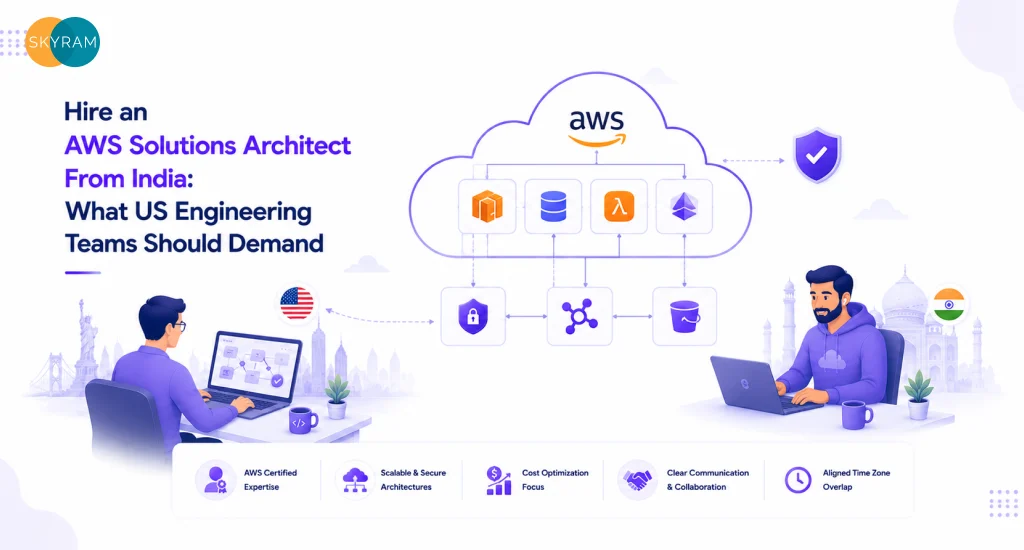
US engineering team reviewing architecture diagram while working with an AWS solutions architect in India via remote collaboration tools

You’re running a lean engineering org. AWS bills are climbing. Your roadmap has a multi-account migration, a Kubernetes move, or a greenfield microservices build sitting in the backlog. Your team is stretched, and hiring a full-time AWS architect at US market rates means a six-figure salary, a slow search, and three months before anyone writes a single Terraform module. So you start looking at the option to hire an AWS solutions architect in India, and you find a lot of noise. Vendor decks. Vague promises. LinkedIn profiles with certifications but no production portfolio. This post cuts through that. It tells you exactly what to demand, what to test, and what to walk away from.

Why US Engineering Teams Are Turning to AWS Architecture Outsourcing India

The math is not subtle. A mid-level AWS solutions architect in the US commands $140,000 to $180,000 annually. An equally credentialed AWS solutions architect, India-based, working on a contract or dedicated-resource model, typically runs 40 to 60 percent less, without sacrificing output quality on well-structured engagements. That cost gap is why the conversation is happening in your boardroom right now.

But cost is only the opening argument. The more compelling case is access. The AWS ecosystem has splintered into specializations, networking, security, data engineering, serverless, FinOps, and finding someone who covers multiple disciplines at a senior level is genuinely hard in any single domestic market. India’s tech talent pool, built over 20 years of offshore delivery for global enterprises, has a high concentration of architects who have delivered production-grade AWS work for US clients across SaaS, fintech, healthcare, and logistics. They have the receipts.

There’s also a structural advantage that gets overlooked: velocity. A properly onboarded offshore AWS architect can extend your working day. Design review happens while your team sleeps. Documentation gets written. Pull requests get reviewed. Architecture Decision Records land in your inbox before your morning standup. For teams under delivery pressure, that’s not trivial.

Key Takeaway: India’s AWS talent market offers genuine cost advantages and deep specialization built on two decades of enterprise delivery for US clients. The real opportunity is not just cost reduction, it’s extending your engineering capacity without the six-month hiring cycle.

What Separates a Real AWS Architect From a Resume With Logos on It

The AWS certification ecosystem is large. As of 2024, more than 400,000 people hold an AWS Certified Solutions Architect credential. The exam tests conceptual knowledge well but does not test production judgment. Plenty of certified architects have never migrated a live database, never debugged a cross-account IAM boundary issue at 2 AM, and never had to explain a $40,000 unexpected bill to a CFO.

When you hire a cloud architect from India, you need to separate the architects who have worked in production from those who have worked in test environments. The difference shows up in specifics.

Production Experience Signals

  • Multi-account architecture: Have they designed AWS Organizations with Control Tower? Have they dealt with Service Control Policies across business units? If not, they have not operated at enterprise scale.
  • IaC proficiency: Terraform and AWS CDK are the current standard. CloudFormation alone is acceptable but signals a narrower toolkit. Ask for a GitHub link or a sanitized architecture diagram from a real deployment.
  • Cost governance work: Real architects have documented FinOps interventions, a specific workload they rightsized, a Reserved Instance purchase strategy they recommended, a Savings Plan they modeled. Ask for numbers.
  • Incident experience: Ask what production incident they have owned and what the root cause was. Architects who have never been in a war room give textbook answers. Real ones give you a specific post-mortem.
  • Security design, not security as an afterthought: Least-privilege IAM, AWS KMS key rotation, GuardDuty findings, Security Hub standards, these should come up without prompting.
Key Takeaway: Certifications are a starting screen, not a qualification. The real evaluation happens when you probe for specific production deployments, cost-governance decisions, and incident ownership. Anyone who cannot give you concrete examples from real workloads is not a senior architect.

The Non-Negotiable Demands for a Remote AWS Solutions Architect Engagement

Hiring remote talent means building a different kind of accountability structure. These are not nice-to-haves. They’re the baseline for any engagement to function.

Overlap Hours and Async Communication Standards

A minimum of three to four hours of daily overlap with your core team is non-negotiable for any architect-level hire. Architecture decisions require back-and-forth. Design reviews require real conversation. If an engineer in your org needs to wait 18 hours for a response on a blocking question, the engagement breaks down fast. Define the overlap window before you sign anything. Put it in the contract.

Async communication standards matter equally. Every architecture decision should produce an Architecture Decision Record (ADR). Every design review should produce documented outcomes. Diagrams should be versioned in your repo, not floating in someone’s personal Confluence. If a candidate cannot describe their documentation practice without being prompted, that’s a signal.

Documentation and Knowledge Transfer

Knowledge concentration risk is real with offshore engagements. If your AWS architect in India goes dark or moves on, your team needs to be able to pick up where they left off. That requires architecture diagrams maintained in tools your team uses (Lucidchart, draw.io, CloudCraft), living runbooks for operational procedures, and a structured handoff protocol written into the engagement terms.

Teams that manage AWS infrastructure at scale often pair their architect with a DevOps practice, because the architecture and the pipeline are not separate concerns. Make sure your engagement covers how the two connect.

SLA on Response and Deliverable Quality

Define what a response SLA looks like. For blocking issues: four hours maximum during overlap. For non-blocking questions: same business day. For deliverables, architecture documents, Terraform modules, cost-optimization reports, define a review-and-revision cycle. Two rounds of revision on any deliverable is a reasonable standard. Open-ended revision loops are how timelines collapse.

Key Takeaway: Overlap hours, documentation standards, and defined SLAs are the operational skeleton of a successful remote AWS architect engagement. Skip any of these in the contract and you will spend the first three months negotiating them under pressure instead.

How to Evaluate an AWS Architect Offshore: The Technical Interview That Works

Most technical interviews for architects fail because they test knowledge, not judgment. AWS architecture is judgment-heavy. The right question is not ‘what is the difference between SQS and SNS?’ The right question is ‘walk me through a messaging architecture you designed and why you made that choice over the alternatives.’

The Architecture Design Exercise

Give candidates a realistic scenario. Something like: ‘You’re migrating a monolithic e-commerce application to AWS. It currently runs on-prem, handles 50,000 daily active users, and the engineering team has no AWS experience. Walk me through your first 90 days.’ A strong candidate will immediately ask clarifying questions, RTO/RPO requirements, compliance constraints, budget envelope, team maturity. A weak candidate will start drawing boxes.

The Cost Scenario

Present a real AWS bill pattern. ‘Our EC2 costs are $28,000 per month and we’re seeing 60% average CPU utilization across our fleet. What do you look at first?’ The answer should include a specific sequence: check instance families, check Reserved Instance coverage, check right-sizing recommendations in Compute Optimizer, check for unused Elastic IPs and orphaned EBS volumes. Vague answers about ‘optimizing resources’ are not acceptable.

The Security Scenario

Ask: ‘How would you design IAM for a 40-person engineering team across three product environments, dev, staging, production, with a mix of contractors and full-time employees?’ The answer should include role-based access, permission boundaries, no long-lived access keys, MFA enforcement, and SCPs if they’re operating with AWS Organizations. Anyone who doesn’t mention permission boundaries and MFA enforcement is not architecting at a professional level.

Key Takeaway: Test judgment, not recall. Give candidates realistic production scenarios and evaluate whether they ask the right clarifying questions before answering. The quality of their questions tells you more about their seniority than the quality of their initial answer.

Quick Reference: Evaluating AWS Solutions Architect Candidates From India

Criteria Strong Candidate Red Flag
AWS Certifications AWS SAP-C02 or SAA-C03 with recent recertification Cert from 5+ years ago, no renewal
Hands-On Experience 3+ production deployments: multi-account, VPC, IAM, IaC Portfolio with only dev or sandbox environments
Communication Can explain architecture trade-offs to non-technical stakeholders Avoids async communication or misses overlap hours
DevOps Integration Comfortable pairing with CI/CD, Terraform, Kubernetes pipelines Works in silos, limited knowledge of pipeline tooling
Security Posture Designs with least-privilege IAM, KMS, GuardDuty from day one Bolts security on post-build or delegates it to a separate team
Cost Governance Uses AWS Cost Explorer, Savings Plans, Compute Optimizer proactively No documented cost-optimization work in prior engagements
Engagement Model Clear SLA on async response time and documentation standards Vague SLA, no documentation protocol

Engagement Models for AWS Architecture Outsourcing India: Which One Fits

Not all engagements are structured the same way. The right model depends on your workload type, timeline, and how much institutional knowledge you want retained.

Project-Based Engagement

Best for a defined scope: a migration, an infrastructure redesign, a Well-Architected Review. You get a senior architect for a fixed timeline, with clear deliverables and a defined handoff. Risk: the architect moves off the engagement after delivery and your team inherits infrastructure they did not build. Mitigate this with aggressive documentation requirements built into the SOW.

Dedicated Resource Model

Best for ongoing work: greenfield builds, continuous architecture governance, or teams that need an embedded architect-level resource without a full-time hire. The architect operates like a team member, attends standups, participates in sprint planning, owns the architecture backlog. This model produces the best knowledge transfer because the architect’s context accumulates over time.

Advisory / Part-Time Model

Best for teams that have junior-to-mid cloud engineers and need senior validation rather than execution. An experienced AWS solutions architect in India reviews designs, signs off on critical changes, and escalates when they see architectural debt accumulating. Lower cost, but requires your internal team to have enough baseline capability to execute independently.

Whichever model you choose, the engagement should connect to your broader cloud services strategy. Review how Skyram’s AWS cloud services approach enterprise architecture work to understand what a structured engagement looks like in practice.

Key Takeaway: The engagement model is a strategic choice, not a procurement decision. Match it to your workload type and knowledge-transfer goals. Dedicated resource models almost always produce better long-term outcomes than project-based engagements for teams that plan to operate the infrastructure themselves after handoff.

Red Flags That Should End the Conversation Immediately

Most bad offshore engagements are predictable. The warning signs appear in the first conversation. Here is what to walk away from:

  • No production portfolio: If a candidate or agency cannot show you architecture diagrams, GitHub repositories, or documented case studies from production AWS environments, the experience does not exist at the level they’re claiming.
  • Overpromised timelines: An architect who tells you they can design and deploy a multi-account AWS environment in two weeks without seeing your current state is telling you what they think you want to hear.
  • No documentation process: If you ask ‘how do you document architecture decisions?’ and the answer is ‘we use Confluence’ without any specifics about templates or version control, documentation will not happen.
  • Single-engineer dependency: If an agency cannot tell you who covers when your primary architect is unavailable, you’re one resignation away from a major problem.
  • Certification-only credentialing: ‘Our team holds 12 AWS certifications’ is not a qualification. Ask what those certified architects have built. Press for specifics. If specifics don’t come, walk.
  • Resistance to a paid trial engagement: A 2-to-4-week paid trial on a scoped piece of real work is a reasonable ask. Any agency that resists this is signaling they cannot perform under scrutiny.
Key Takeaway: The warning signs are consistent across bad offshore engagements. If a vendor cannot show you production work, cannot describe their documentation process, or resists a trial engagement, move on. The cost of a failed engagement is far higher than the cost of a longer vendor search.

Frequently Asked Questions

  1. What qualifications should I require when I hire an AWS solutions architect in India?

At minimum, require a current AWS Certified Solutions Architect – Professional (SAP-C02) or Associate (SAA-C03) credential combined with a documented production deployment portfolio. Certifications confirm conceptual knowledge; the portfolio confirms execution capability. Ask specifically for multi-account AWS environments, IaC-managed infrastructure (Terraform or CDK), and at least one cost-optimization case study with documented savings.

  1. How do I verify that an AWS architect offshore has real production experience?

Ask for specific project examples: the cloud environment they designed, the scale of the workload, the tools they used, and what went wrong and why. Request sanitized architecture diagrams from a completed engagement. If they have GitHub activity, review it. Ask what their most complex IAM scenario was and how they resolved it. Architects with real production experience give specific, unprompted detail. Those without it give general answers that sound technically correct but lack operational texture.

  1. What is a fair overlap expectation for a remote AWS solutions architect?

Three to four hours of daily overlap with your core engineering team is the functional minimum for an architect-level hire. This window accommodates synchronous design reviews, architecture Q&A, and escalation for blocking issues. Less overlap than this shifts too much communication to async, which works for junior execution roles but creates risk at the design level where context is high and decisions are consequential.

  1. Is AWS architecture outsourcing in India appropriate for regulated industries like fintech or healthcare?

Yes, with proper contractual and technical controls. Ensure your engagement includes a signed BAA or appropriate data processing agreement, explicit data residency requirements, and architecture designs that default to AWS GovCloud or HIPAA-eligible service configurations. Your architect should have direct experience with compliance-driven architecture, not just awareness of it. Ask for examples from prior healthcare or financial services engagements.

  1. What is the difference between a cloud architect and a DevOps engineer, and do I need both?

A cloud architect designs the infrastructure topology, account structure, networking, and service selection. A DevOps engineer builds and maintains the delivery pipelines, monitoring systems, and operational runbooks that run on top of that infrastructure. For most product engineering teams above 10 engineers, you need both. The architect sets the foundation; the DevOps function keeps it running and deployable. On smaller teams, a senior architect with strong IaC skills can cover both, but the role boundaries will eventually need to separate as scale increases.

  1. How long does it typically take to onboard a remote AWS solutions architect?

A structured onboarding takes two to three weeks for a dedicated resource engagement. The first week covers environment access, existing architecture review, and codebase orientation. The second week focuses on gap analysis and the first design proposals. By the end of week three, a strong architect is producing independent deliverables. Engagements that skip structured onboarding, treating the architect as a task-executor from day one, consistently underperform.

  1. What should the contract cover beyond the hourly or monthly rate?

The contract should define: daily overlap hours and communication SLAs, documentation deliverables (ADRs, architecture diagrams, runbooks), IP ownership of all work product, data handling and confidentiality obligations, coverage protocols if the primary architect is unavailable, and a defined offboarding and knowledge transfer process. Rate is the last thing to negotiate. Everything else should be settled first.

Ready to Build the Right AWS Architecture Team?

US engineering teams that get offshore AWS architecture right share one thing in common: they treated the engagement as a strategic hire, not a cost play. They defined what they needed, tested for production judgment, and built contractual accountability into the engagement from day one. If you’re at the point where you know you need senior AWS architecture capability and want to evaluate what a structured engagement looks like, Skyram Technologies works with US engineering organizations to deliver cloud architecture, DevOps, and infrastructure strategy with the accountability structures your team needs. Talk to the team, describe your environment, and find out whether the fit makes sense.
AI Content Optimization Services: Future-Proofing US Marketing for Generative Search

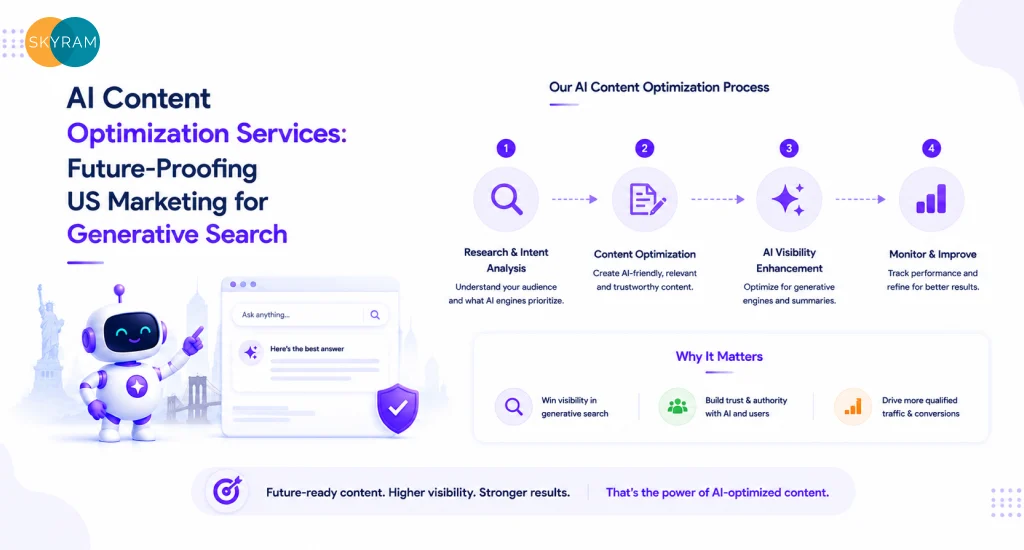
Abstract graphic showing AI content signals being processed into search rankings, representing AI content optimization services for US marketers

Your traffic analytics changed sometime in the past twelve months. Pages that ranked steadily for years started dropping. Some lost featured snippets to AI Overviews. Others got absorbed into generative summaries without any click through to your site. The culprit is not a Google algorithm update in the traditional sense. It is a structural shift in how search engines consume, evaluate, and surface content.

AI content optimization services exist to address exactly this problem. They reformat, restructure, and re-signal your content so that both human readers and large language models can extract, trust, and cite it. For US content managers and CMOs watching organic traffic metrics flatten, this is where the strategic response starts.

What AI Content Optimization Actually Means in 2026

The term gets used loosely, so a precise definition matters. AI content optimization is the practice of structuring and signaling digital content so that AI-powered search systems, including Google’s AI Overviews, Bing Copilot, and retrieval-augmented generation (RAG) models, can accurately parse, summarize, and attribute it.

This is meaningfully different from traditional SEO. Traditional SEO optimized for crawlers that scored signals like keyword frequency, backlink authority, and on-page structure. Generative search engines work differently. They ingest content to understand it at a semantic level, identify source credibility, and decide whether a page is worth citing in a generated answer or surfacing directly.

Three Core Layers of AI Content Optimization

Effective optimization works across three distinct layers:

  • Semantic structure: Using clear definitional paragraphs, consistent entity references, and schema markup so AI models can map your content to specific topics and queries.
  • Answer-first formatting: Placing direct answers within the first 40 to 60 words of a section so that AI extraction picks up the response before context degrades.
  • Authority signaling: Using author attribution, citation links, and factual specificity to score high on the E-E-A-T signals that generative models use to determine source trustworthiness.

Brands that treat these as optional upgrades are already ceding ground to competitors who treat them as baseline requirements.

Key Takeaway: AI content optimization is not an extension of traditional SEO. It is a distinct practice focused on making content legible and credible to generative search systems. Ignoring the structural differences between these two approaches will produce content that ranks for neither humans nor machines effectively.

Why US Brands Need AI Content Optimization Services Now

US search behavior is shifting faster than most marketing teams have acknowledged internally. According to data from SparkToro and Semrush published in 2024, zero-click searches now account for more than 60% of Google searches in the United States. A significant and growing share of those zero-click outcomes arrive because an AI Overview or featured snippet answered the query without the user needing to visit any website.

For B2B companies, this means the top-of-funnel content pipeline that drove awareness and lead entry points now faces a structural disruption. A well-optimized pillar post that once pulled 3,000 monthly visits may now generate a fraction of that because the AI Overview pulls the answer directly and the user never clicks.

The B2B Stakes Are Higher Than They Look

Enterprise buyers in the US increasingly start product and vendor research through AI-assisted search. They ask a question. They get a synthesized answer that references two or three authoritative sources. If your brand is not one of those cited sources, you are invisible at exactly the moment the buyer is forming their initial shortlist.

Vendors who invest in AI content optimization services and USA-focused strategies right now have a compounding advantage. The models that generate AI Overviews pull from indexed content that already exists. Getting your content into that citation pool before competitors do is a timing advantage that is genuinely difficult to reverse later.

Key Takeaway: The US search landscape is not trending toward AI-influenced results. It has already arrived. Content teams that have not restructured their assets for generative search are losing top-of-funnel visibility right now, not at some future inflection point.

Core Components of a High-Performance AI Content Optimization Strategy

The brands getting cited in AI Overviews share specific structural and technical characteristics across their content. These are not random. They reflect how large language models are trained to identify credible, extractable answers.

Generative Engine Optimization (GEO)

GEO is the practice of optimizing content specifically for AI-driven search engines rather than traditional blue-link results. The key signals include entity density (how clearly and frequently your content references named concepts, organizations, and products), source consistency (whether your content contradicts itself or other credible sources), and structural predictability (whether AI models can identify the question-answer pattern reliably within each section).

A GEO-optimized page answers a question within the opening sentence of each key section. It does not bury the answer after three paragraphs of context. That structural discipline is what separates content that gets cited from content that gets skipped.

Answer Engine Optimization (AEO)

AEO focuses on the voice search and direct-answer use cases where the AI system needs to surface a single, authoritative response. For B2B content, AEO-optimized sections are self-contained: they define the term, explain its significance, and quantify the impact without requiring the reader or the AI model to pull context from another section.

FAQ sections built for AEO follow a strict pattern: each question mirrors the exact phrasing a user would type or speak, and each answer is complete in 40 to 80 words without referencing content elsewhere on the page.

Schema Markup and Structured Data

JSON-LD schema remains one of the highest-impact technical signals available. FAQPage schema, HowTo schema, and Article schema with author and publisher markup tell search systems what type of content they are processing before they parse a single sentence. Pages without schema make AI models work harder to classify content correctly, and that extra uncertainty often means the content gets deprioritized.

Content Depth Calibration

Depth means specific, not long. A 1,200-word article that answers a question with named examples, quantified outcomes, and clear methodology beats a 3,500-word post that circles the same ideas repeatedly. AI models score specificity. Vague language, hedged claims, and unsupported generalizations all depress the likelihood that content gets cited.

Key Takeaway: A strong AI content optimization strategy integrates GEO, AEO, structured data, and content depth calibration as a unified system. Optimizing only one layer while ignoring others leaves measurable gaps in search visibility that compound over time.

How AI Content Optimization Services Differ Across Providers

Not every provider offering AI content optimization delivers the same scope or methodology. The differences matter for budget allocation and expected outcomes.

Audit-Only vs. Full-Service Optimization

Audit-only providers diagnose gaps: missing schema, thin content, poor semantic structure, keyword cannibalization. They produce recommendations but leave execution to your internal team. Full-service providers audit, rewrite, restructure, and implement, then track performance against defined metrics. For teams that lack the bandwidth or technical depth to execute complex structural changes at scale, audit-only rarely moves the needle.

AI-Assisted Content Production

Some providers use AI writing tools to generate first drafts at high volume, then apply optimization frameworks before delivery. Others treat AI as a research and analysis tool while keeping the actual writing human. Neither model is categorically superior. The quality of the prompt engineering, editorial oversight, and post-generation optimization determines output quality, not the presence or absence of AI in the production pipeline.

Technical SEO Integration

Content optimization without technical SEO integration consistently underperforms. Page speed, Core Web Vitals, mobile usability, and crawl accessibility all affect whether your optimized content gets indexed correctly. Providers who treat content and technical SEO as separate workstreams tend to create situations where beautifully structured content sits behind crawl barriers or loads too slowly to rank.

Key Takeaway: Provider selection for AI content optimization services should prioritize full-service execution, transparent methodology, and integrated technical SEO support. Providers who operate in isolation from technical teams or who rely entirely on AI-generated output without editorial rigor will produce inconsistent results.

Building an AI-Ready Content Architecture from Scratch

US marketing teams who are starting from zero with generative search optimization face a sequencing challenge. Everything cannot happen at once, and the wrong sequencing wastes budget on content that cannot perform until foundational issues get fixed.

Phase 1: Technical Baseline

Before restructuring any content, confirm that your site can be indexed accurately. Run a crawl audit. Fix redirect chains, broken internal links, and canonicalization errors. Verify that Core Web Vitals meet current thresholds across both desktop and mobile. Schema implementation starts here too: site-level Organization and WebSite schema, then page-level markup as content gets optimized.

Phase 2: Keyword Cluster Prioritization

Not all keyword clusters have equal potential in generative search. Informational queries with clear answer structures get featured in AI Overviews far more often than navigational or commercial queries. Map your existing content against informational intent first. These pages represent the fastest path to AI Overview citations and the strongest return on initial optimization investment.

Phase 3: Content Restructuring

Each priority page gets restructured using the GEO and AEO principles described above. This means rewriting opening paragraphs to lead with answers, adding structured FAQ sections, implementing schema, and tightening entity references throughout. For long-form pillar posts, this often means splitting one sprawling article into a tightly organized pillar plus multiple supporting cluster posts that each answer a specific question with depth.

Phase 4: New Content Production

Once the existing archive is optimized and indexed, new content production scales up against the remaining keyword targets. Each new post gets built to the optimized standard from the first draft rather than needing a retroactive fix. This phase is where volume compounds: a strong technical and structural foundation means each new post starts with a higher baseline probability of getting cited. 

Key Takeaway: AI-ready content architecture is a phased investment, not a one-time project. Teams that try to skip the technical baseline phase and go straight to content production end up republishing optimized content on a foundation that limits its indexing and citation potential.

Measuring the ROI of AI Content Optimization

ROI measurement for AI content optimization services requires different metrics than traditional SEO tracking. Click-through rates and raw organic traffic tell only part of the story when a growing share of search value comes from brand citations in AI Overviews rather than direct clicks.

Metrics That Matter Now

  • AI Overview citation frequency: Track how often your brand or specific pages appear as cited sources in AI Overviews for target queries. Tools like BrightEdge and SE Ranking have added AI Overview tracking to their reporting suites.
  • Share of voice in generative results: Monitor what percentage of relevant AI-generated answers in your category reference your content versus competitor content.
  • Branded search lift: As your content gets cited more frequently in AI Overviews, expect measurable increases in branded search queries. Users who see your brand attributed as a source often follow up with a direct branded search.
  • Lead quality and conversion rate from organic: If content is properly structured for TOFU and MOFU intent, leads arriving from organic should convert at higher rates than before because they arrive with more contextual knowledge about your solution.

Do not abandon traditional metrics entirely. Keyword rankings, organic sessions, and bounce rate still provide useful diagnostic signals. The goal is to build a reporting framework that captures both traditional search performance and emerging generative search visibility.

Key Takeaway: ROI measurement for AI content optimization must expand beyond clicks and rankings to include AI Overview citation tracking and branded search lift. Teams that evaluate this investment using only traditional SEO metrics will systematically undercount the value being generated.

Frequently Asked Questions 

1. What are AI content optimization services?

AI content optimization services are professional services that restructure, reformat, and re-signal website content to improve its visibility and citation frequency in AI-powered search results, including Google AI Overviews, Bing Copilot, and answer engine interfaces. The work typically includes semantic restructuring, schema implementation, FAQ optimization, and content depth calibration to make content legible and credible to large language models.

2. How do AI content optimization services differ from traditional SEO?

Traditional SEO optimizes content for crawler-based ranking algorithms that score signals like keyword frequency, backlink volume, and page authority. AI content optimization targets generative search systems that process content semantically, assessing whether it contains complete, credible, and extractable answers to user queries. The structural requirements are different: generative search rewards answer-first formatting, entity clarity, and source credibility signals that traditional SEO does not prioritize in the same way.

3. Which US industries benefit most from AI content optimization services?

B2B technology, professional services, healthcare, financial services, and legal sectors see the highest lift from AI content optimization because their buyers conduct extensive research through AI-assisted search before contacting vendors. These industries also have high-value long-tail queries with clear informational intent, which are exactly the query types that AI Overviews favor. However, any sector where buyers research online before converting benefits from this approach.

4. How long does it take to see results from AI content optimization?

Structural changes to existing content can produce AI Overview citation improvements within four to eight weeks for pages that are already indexed and receiving some organic traffic. New content built to the optimized standard typically takes eight to sixteen weeks to accumulate the crawl frequency and index depth needed for consistent AI Overview citations. Technical SEO fixes like schema implementation and Core Web Vitals improvements tend to produce faster indexing gains that accelerate subsequent content performance.

5. What is the role of AEO in AI content optimization?

Answer Engine Optimization (AEO) is the specific practice of structuring content to perform in direct-answer and voice search interfaces where AI systems need to surface a single, concise, authoritative response. Within a broader AI content optimization strategy, AEO handles FAQ architecture, definitional paragraph construction, and the answer-first formatting that makes content extractable by AI Overviews. It works alongside GEO, which targets AI-driven search engines more broadly, and traditional SEO, which addresses crawler-based ranking signals.

6. Do I need to replace all my existing content to benefit from AI content optimization services?

No. A strategic audit identifies which existing pages have the highest potential for AI Overview citations based on current traffic, keyword intent, and structural gaps. High-potential pages get restructured and enhanced rather than replaced. Thin or duplicate pages may get consolidated or retired. Completely new content is only justified for keyword clusters where no existing asset can be cost-effectively upgraded. The most efficient approach layers optimization across existing high-value content first before scaling new production.

7. How do AI content optimization services usa providers handle schema implementation?

Reputable providers implement schema at two levels: site-wide organizational markup that establishes brand identity and publisher authority, and page-level schema that classifies each content type accurately, including Article, FAQPage, HowTo, and Product schemas where relevant. Schema gets added via JSON-LD in the page head, validated against Google’s Rich Results Test, and monitored through Search Console for errors. For enterprise sites, schema implementation typically connects to the CMS templating layer so new pages inherit correct markup automatically.

Ready to Make Your Content Visible to Generative Search?

The gap between brands that appear in AI Overviews and those that do not will widen over the next eighteen months. Content that is not structured for generative search will continue losing share of voice to competitors who invested in the right optimization framework earlier.

Skyram Technologies works with US marketing teams to audit existing content, implement GEO and AEO frameworks, and build scalable production systems that generate AI-ready content from the first draft. The process is diagnostic first: we identify exactly which pages have the highest citation potential and what structural changes would activate that potential fastest.

Start with a content audit or explore our AEO services to understand how your content performs against generative search benchmarks. Contact Skyram Technologies to schedule a consultation with our content strategy team.

Talk to Skyram Technologies about AI content optimization for your US marketing strategy. No templates, no generic audits, just a structured assessment of where your content stands and what it takes to get cited.

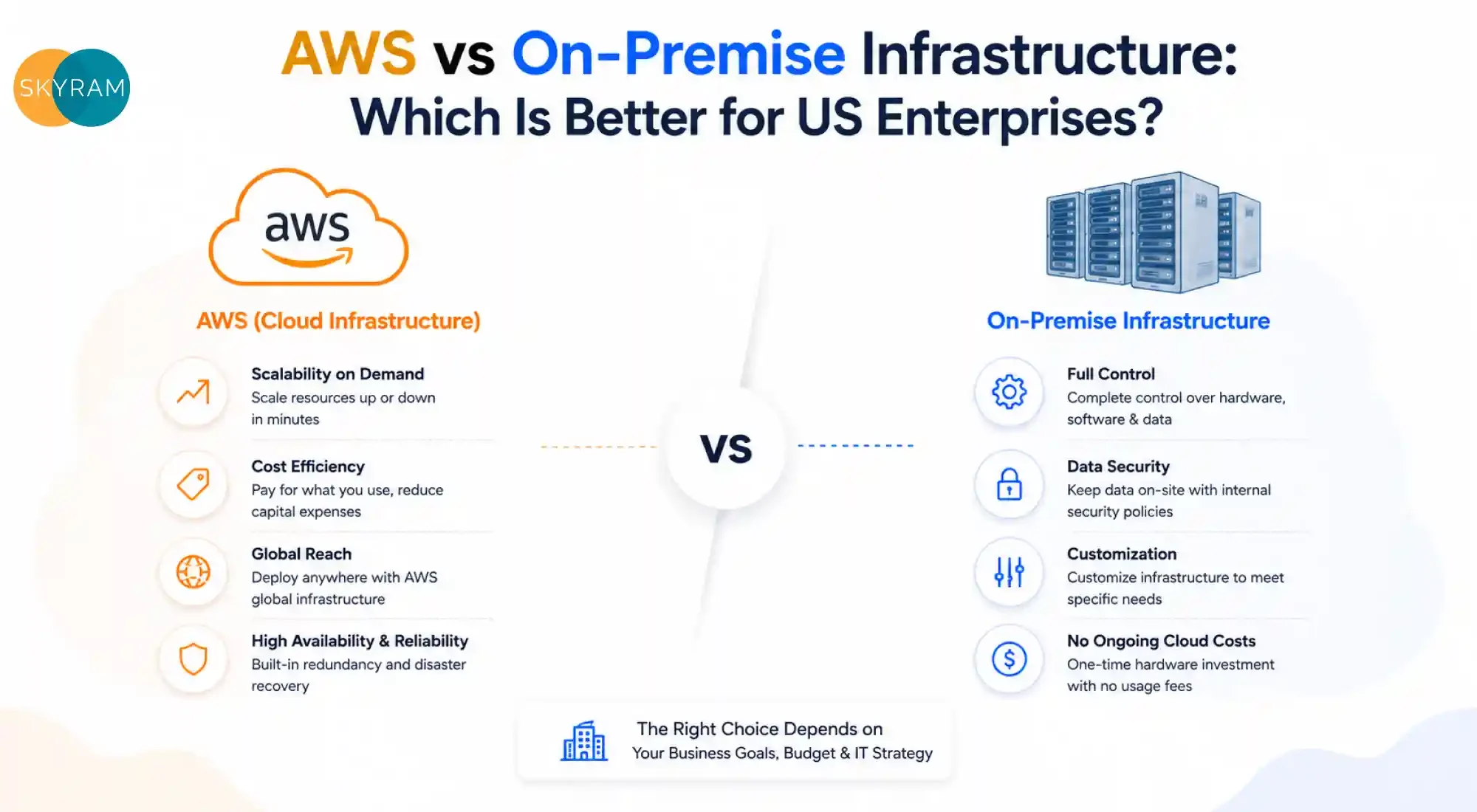
AWS vs On-Premise Infrastructure: Which Is Better for US Enterprises?

AWS vs On Premise What's Better

If you’re a CTO or IT director, you’ve probably had this debate at least once in the last year. Do you keep investing in your on-premise setup, or do you finally make the move to AWS cloud services in the USA? It’s not a small decision, and the answer isn’t one-size-fits-all.

Both options have their merits. But as enterprise workloads get more complex and business demands shift faster, the question isn’t just about cost anymore. It’s about agility, security, compliance, and where your team’s time is best spent.

Let’s break it down properly.

The State of Cloud Adoption in the US

Before we get into the comparison, here’s some context worth knowing.

As of 2025, 94% of enterprises report using cloud services in some form. Only 5% of companies intend to revert to on-premises infrastructure. AWS leads the global cloud infrastructure market with a 28% share in Q1 2026, ahead of Azure (21%) and Google Cloud (14%). And global cloud infrastructure spending hit $129 billion in just Q1 2026, growing 35% year over year.

These numbers don’t exist in a vacuum. They reflect the direction most US enterprises are moving in, and for good reason.

What On-Premise Infrastructure Actually Means Today

On-premise (or on-prem) infrastructure means your servers, storage, and networking hardware all live within your own facility or a co-location data center. Your IT team manages everything: hardware procurement, configuration, maintenance, upgrades, and physical security.

For a long time, this was the default. You owned your stack, you controlled your data, and you knew exactly where everything was.

The challenge is that this model comes with real trade-offs in a fast-moving digital environment. You’re managing capital-heavy assets, dealing with upgrade cycles, and absorbing the full cost of idle capacity. For enterprises with predictable, stable workloads, on-prem can still make strong financial sense. But for growing, dynamic organizations, it starts to show its limitations quickly.

Understanding AWS Cloud Services in the US

AWS cloud services in the USA cover a massive surface area: compute (EC2), storage (S3), databases (RDS, DynamoDB), machine learning (SageMaker), security tools, DevOps automation, analytics, and hundreds of other managed services.

The core value proposition is straightforward. You don’t own the hardware; you rent capacity as you need it. AWS runs the infrastructure, you focus on your applications and business logic. Everything from failover to physical security to hardware refresh is handled by Amazon.

US enterprises across healthcare, finance, retail, and government are leveraging AWS not just to cut costs, but to move faster, build more resilient systems, and access capabilities that would take years to build in-house.

AWS vs On-Premise: A Direct Comparison

Here’s how the two options stack up across the dimensions that matter most to enterprise IT leaders.

Factor AWS Cloud On-Premise
Upfront Cost Low (pay-as-you-go) High (CapEx for hardware, licensing)
Operational Cost Variable; 51% lower than on-prem on average Predictable but fixed and ongoing
Scalability Near-instant, on demand Limited by physical hardware capacity
Security Control Shared responsibility model; enterprise-grade tools Full internal control
Compliance AWS supports HIPAA, SOC 2, FedRAMP, and PCI DSS Full internal control; better for some regulated workloads
Maintenance Managed by AWS Managed by your internal team
Disaster Recovery Built-in multi-region redundancy Requires additional investment
Innovation Access Immediate access to AI/ML, analytics, serverless Requires separate procurement and deployment
Downtime Risk 69% reduction in unplanned downtime vs on-prem Dependent on internal SLAs and redundancy

Cost: Where the Numbers Get Interesting

Cost is usually the first conversation, but it’s rarely straightforward.

On the cloud side, IDC research shows AWS delivers 51% lower operational costs than on-premise setups. Over three years, AWS demonstrates 52% lower total costs, driven mainly by eliminating overprovisioning and avoiding hardware refresh cycles. 

Customers who migrate to AWS through the Migration Acceleration Program report an average of 31% infrastructure savings, and IT infrastructure management becomes 62% more efficient after migration.

On the on-prem side, stable workloads with predictable, high utilization can actually be more cost-effective over the long run. One scenario found that for 1,000 VMs with 150 TB bandwidth, a managed private cloud costs $16,288 per month compared to $60,450 for a public cloud. The annual difference? Nearly $530,000. 

For sustained, high-compute tasks like continuous generative AI workloads, on-prem often reaches a breakeven point within 12 to 22 months and becomes significantly cheaper after that.

Key Cost Takeaway

  • Cloud wins for variable, bursty, or unpredictable workloads
  • On-prem wins for sustained, high-utilization, predictable workloads (especially AI/ML at scale)
  • Hybrid wins when you have both types of workloads

AWS also offers Reserved Instances and Savings Plans that can reduce compute costs by up to 72% compared to on-demand pricing, closing the gap significantly for longer-term commitments.

Scalability: Where Cloud Has a Clear Edge

If your business experiences growth spurts, seasonal peaks, or variable demand, on-prem will always struggle to keep up. You’re either over-provisioned (wasting money) or under-provisioned (hurting performance).

AWS cloud services in the USA solve this directly. You can scale compute up in minutes during a product launch or traffic spike, then scale back down when demand normalizes. You’re never paying for idle hardware, and you’re never caught short.

For US enterprises building modern applications, launching new products, or running distributed teams across time zones, this elasticity is a genuine competitive advantage. Cloud computing platforms are projected to grow at a CAGR of 14.1% from 2023 to 2030, largely because enterprises recognize that static infrastructure simply can’t match the pace of digital business.

Security: More Nuanced Than You’d Think

This is where the conversation gets more nuanced. Both options can be secure. The real question is: secure in what context?

On-premise gives you granular control. You decide who accesses what, where data physically lives, and how security policies are enforced at the hardware level. For organizations in highly regulated verticals, that level of control can be essential.

AWS, however, operates on a shared responsibility model. Amazon secures the underlying infrastructure, data centers, and global network. You’re responsible for securing your data, access controls, and application configuration. AWS supports a wide range of compliance frameworks, including HIPAA for healthcare, FINRA for financial services, SOC 2, FedRAMP for government, and PCI DSS for payment data.

The key risk on the cloud side isn’t the platform itself, but misconfiguration. Improperly set access policies and exposed storage buckets are far more common causes of cloud breaches than AWS platform vulnerabilities. With proper configuration and the right expertise in place, cloud security is enterprise-grade.

Compliance Considerations for US Enterprises

Industry Key Regulation AWS Support
Healthcare HIPAA AWS offers HIPAA-eligible services
Financial Services FINRA, SOX AWS supports financial compliance frameworks
Government/Defense FedRAMP, NIST 800-171 AWS GovCloud regions are available
E-commerce PCI DSS AWS is PCI DSS Level 1 certified
General Enterprise SOC 2 AWS SOC 2 Type II certified

Operational Resilience and Downtime

Unplanned downtime is expensive. For US enterprises, even an hour of system downtime can translate into millions in lost revenue, especially in e-commerce, financial services, or SaaS.

Customers moving from on-premises to AWS see a 69% reduction in unplanned downtime. AWS achieves this through multi-AZ deployments, auto-scaling, health checks, and global redundancy built into the platform. On-prem systems can achieve high availability, too, but it requires additional hardware, manual configuration, and a dedicated team to maintain them.

With on-prem, your disaster recovery plan is only as good as your last budget cycle and your team’s bandwidth. With AWS, multi-region failover is a configuration setting away.

Innovation Velocity: The Hidden Advantage of Cloud

Here’s something that doesn’t get talked about enough in the AWS vs on-prem debate: the speed at which you can innovate.

AWS offers over 200 fully featured services. Need to add an AI-powered search? There’s a service for that. Need to run serverless functions at a global scale? Done. Need to spin up a new analytics pipeline for your data team? You’re looking at hours, not months.

On-prem requires procurement, provisioning, testing, and deployment for every new capability. The feedback loop is long. For US enterprise IT teams already stretched thin, that lag has a real cost in missed opportunities and slower product cycles.

Cloud gives your team the ability to experiment without the overhead of infrastructure management, and that translates directly to competitive speed.

When On-Premise Still Makes Sense

To be fair, there are use cases where on-premises is the right call.

  • Highly regulated, air-gapped environments where data sovereignty is non-negotiable
  • Sustained, high-utilization workloads that run continuously at near full capacity (especially large-scale AI/ML inference)
  • Legacy applications that are tightly coupled to proprietary hardware and cannot easily be refactored
  • Organizations with significant existing CapEx where the hardware has not yet been fully amortized

In these cases, a full cloud migration may not deliver the expected ROI. A hybrid or phased approach often makes more strategic sense.

The Hybrid Angle: Not Either/Or

Many US enterprises aren’t making a binary choice. The most pragmatic approach is often a hybrid model: run latency-sensitive, compliance-critical, or high-steady-state workloads on-prem, while running dynamic, scalable, or AI-driven workloads on AWS.

This lets you get the cost predictability of on-prem for what you already own, while gaining the agility of AWS cloud services in the USA for what you’re building next. AWS itself supports hybrid architectures through AWS Outposts, Direct Connect, and a range of hybrid networking tools.

The cloud migration market is projected to grow from $232.51 billion in 2024 to $806.41 billion by 2029, reflecting that enterprises are moving toward cloud, but doing it strategically, not all at once.

How Skyram Technologies Powers Your Cloud Decision

At Skyram Technologies, we know that no two enterprises have the same infrastructure challenge. We work with IT leaders to assess their current stack, model the true total cost of ownership, and build a migration or optimization roadmap that actually fits their business, not a generic template.

Whether you’re evaluating a full migration to AWS cloud services in the USA, looking at a hybrid architecture, or trying to optimize what you already have in the cloud, we bring the technical depth and strategic clarity to make it happen right. Our team has hands-on experience across AWS services, from EC2 and S3 to EKS, RDS, and SageMaker, so we can meet you wherever you are in your cloud journey.

We help you skip the guesswork and get to a clear, defensible answer for your board and your team.

So, Which Is Better for US Enterprises?

There’s no universal answer, but there is a framework.

If your workloads are variable, your team is scaling, you need compliance flexibility, and you want to move fast: AWS cloud services in the USA will almost always come out ahead. The 51% cost reduction, 69% drop in unplanned downtime, and immediate access to cutting-edge services make a compelling case.

If your workloads are stable, high-utilization, and deeply tied to regulatory environments with strict data residency requirements, on-prem or a hybrid model may serve you better, at least for now.

The enterprises winning this decade aren’t choosing sides. They’re choosing the right tool for each workload and building an infrastructure strategy flexible enough to evolve. That’s the real question to be asking.

Stop guessing. Schedule a Cloud Consultation with Skyram Technologies and get a clear, tailored roadmap for your AWS cloud services journey.

Frequently Asked Questions

Q1: What is the main cost difference between AWS and on-premises for US enterprises?

AWS typically delivers 51% lower operational costs over three years by eliminating hardware CapEx, reducing idle capacity, and lowering IT management overhead compared to on-premise setups.

Q2: Is AWS secure enough for healthcare or financial enterprises in the US?

Yes. AWS supports HIPAA-eligible services for healthcare and complies with FINRA, SOC 2, and PCI DSS for financial services, making it suitable for heavily regulated US industries.

Q3: When does on-premise infrastructure make more financial sense than AWS?

On-premise solutions are often more cost-effective for sustained, high-utilization workloads that run continuously, especially for large-scale AI/ML inference, where hardware costs are amortized over time.

Q4: Can US enterprises use both AWS and on-premise infrastructure together?

Yes. A hybrid model is a common and strategic choice, utilizing on-premises infrastructure for stable or compliance-sensitive workloads while leveraging AWS for scalable, dynamic, or innovative applications.

Q5: How long does it take to migrate from on-premise to AWS?

Migration timelines vary by complexity. A structured approach using frameworks like the AWS Migration Acceleration Program (MAP) can significantly reduce risk and accelerate the process through defined assess, mobilize, and migrate phases.

Your Business Deserves Better Infrastructure: Here Are 10 Reasons AWS Cloud Is the Answer in 2026

blog img1

What happens when your business grows faster than your infrastructure can handle?

Most businesses do not realize their infrastructure is holding them back until growth starts exposing the cracks. Systems slow down. IT costs rise unexpectedly. Scaling becomes complicated. Security feels reactive instead of proactive. What once felt “good enough” quietly becomes a limitation.

That is exactly why so many US businesses are moving toward AWS in 2026. Not because cloud migration is trendy, but because modern businesses need infrastructure that can scale, adapt, and support long-term growth without creating operational chaos.

The Problem Every Growing US Business Faces Right Now

You built your business on a foundation that made sense five years ago. On-premises servers, fixed IT contracts, storage hardware that costs a fortune to upgrade, and a disaster recovery plan that exists mostly on paper. It worked. Until it didn’t.

In 2026, the gap between businesses running on legacy infrastructure and those running on the cloud is no longer a gap. It’s a canyon. Companies still managing their own physical servers are spending 30 to 40% more on IT operations than their cloud-native competitors, according to Flexera’s State of the Cloud report. And they’re doing it for less performance, less security, and far less flexibility.

If your servers are your bottleneck, your servers are your problem.

Amazon Web Services is not a buzzword. It is, by measurable distance, the world’s leading cloud platform: 31% of the global cloud infrastructure market as of Q1 2026. More than 1 million active customers. Services spanning compute, storage, AI, databases, analytics, security, and everything in between.

The question isn’t whether AWS is proven. The question is: what’s the cost of staying where you are?

Here are the 10 most compelling reasons US businesses are making the move to AWS in 2026, and why it matters for yours.

What Is AWS Cloud, and Why Does It Dominate?

AWS (Amazon Web Services) is a comprehensive cloud computing platform that gives businesses on-demand access to computing power, storage, databases, machine learning tools, networking, and hundreds of other services, all delivered over the internet, all billed by actual usage.

Launched in 2006, AWS has spent two decades building the most mature, reliable, and feature-rich cloud ecosystem on the planet. It now operates across 39 geographic regions and 123 availability zones globally, giving businesses redundancy and reach that no on-premises setup can realistically replicate. 

For US businesses specifically, AWS offers domestic data residency options, strong HIPAA and SOC 2 compliance frameworks, FedRAMP authorization for government-adjacent sectors, and deep integrations with the tools American businesses already use.

Quick Definition: AWS Cloud is a pay-as-you-go infrastructure platform that replaces physical IT hardware with on-demand cloud services, giving businesses elasticity, security, and global reach without capital expenditure.

The 10 Benefits of Moving Your Business to AWS Cloud in 2026

For US businesses, AWS is no longer just an IT upgrade. It is a faster, more scalable, and more resilient way to build, operate, and grow in an increasingly digital economy. 

1. Dramatic Cost Reduction Without Sacrificing Performance

The upfront cost of owning and maintaining physical servers is significant: hardware purchase, power consumption, cooling systems, IT staff, maintenance contracts, and scheduled upgrades. AWS eliminates most of that.

With AWS, you pay for what you use. Scale up during peak demand. Scale back during quiet periods. No idle hardware sitting in a server room burning electricity.

When you compare the two side by side, the gap is clear:

Cost Category Traditional On-Premises AWS Cloud
Hardware Purchase High upfront CapEx None
IT Maintenance Staff Full-time overhead Reduced significantly
Disaster Recovery Setup Costly secondary site Built-in, low cost
Scaling Infrastructure Long procurement cycles Minutes
Energy and Cooling Ongoing operational cost Eliminated


Gartner estimates that organizations migrating to cloud infrastructure reduce total IT costs by 20 to 40% on average, with the largest savings coming from reduced hardware and staffing overhead.

2. Unmatched Scalability for Businesses at Every Stage

A retail business handling 500 transactions a day doesn’t need the same infrastructure as one handling 50,000. But when Black Friday arrives, it does.

AWS Auto Scaling lets your infrastructure expand automatically when demand spikes and contract when it eases. This means no over-provisioning for peak moments that only happen a few times a year, and no under-performance when those moments arrive.

For US businesses in growth mode, this is transformative. You can launch in one state, scale nationally, and expand internationally, all without a single new server purchase.

3. Enterprise-Grade Security Built into Every Layer

One of the most persistent myths about cloud computing is that it’s less secure than on-premises. The reality is the opposite, particularly with AWS.

AWS supports 143 security standards and compliance certifications globally. Its shared responsibility model means AWS secures the underlying cloud infrastructure, including physical facilities, networking, and hardware, while you remain responsible for securing your data, applications, identities, and access controls. 

For US businesses, AWS provides:

  • HIPAA eligibility for healthcare data
  • SOC 1, SOC 2, and SOC 3 compliance
  • FedRAMP authorization for government-related workloads
  • PCI DSS compliance for payment data
  • Advanced identity management through AWS IAM

The average cost of a data breach in the US reached $9.48 million in 2023, according to IBM’s Cost of a Data Breach Report. AWS’s layered security architecture significantly reduces that exposure.

4. Business Continuity and Disaster Recovery That Actually Works

When your on-premises server fails, your business stops. Recovery depends on how well your backup plan was designed, how recently it ran, and how fast your IT team can respond. That’s a lot of variables.

AWS makes disaster recovery a native capability, not an afterthought. With services like AWS Backup, Multi-AZ deployments, and Amazon S3 redundancy across multiple availability zones, your data is protected even when individual infrastructure components fail.

Recovery time objectives (RTOs) that used to take hours or days on traditional infrastructure can be reduced to minutes on AWS. For US businesses in regulated industries, financial services, healthcare, and legal, this isn’t a feature. It’s a requirement.


5. Global Reach with Local Performance

Your customers don’t all live in the same city. Some of them are across the country. Some are in Canada, Europe, or Latin America. AWS operates 33 regions globally, with multiple US-specific regions including US East (Northern Virginia), US East (Ohio), US West (Oregon), and US West (Northern California).

Amazon CloudFront, AWS’s content delivery network, ensures your applications and content load fast regardless of where your users are located. For US businesses expanding internationally, this is the difference between a product that works globally and one that frustrates users the moment they cross a border.

6. Access to AI, Machine Learning, and Advanced Analytics

Here is where AWS separates itself from basic cloud storage. AWS offers more than 200 fully featured services, and a growing portion of them are AI and machine learning capabilities that, just five years ago, were only accessible to companies with dedicated data science teams.

Services like Amazon SageMaker (ML model building and deployment), Amazon Rekognition (image and video analysis), Amazon Comprehend (natural language processing), and Amazon Bedrock (generative AI integration) give US businesses access to enterprise-grade AI at a fraction of what it would cost to build in-house.

In 2026, businesses using AI-powered cloud tools are making faster decisions, personalizing customer experiences at scale, and automating processes that used to require human hours. This is not a future trend. It is a present competitive reality.

7. Faster Development and Deployment Cycles

If your development team is spending time managing infrastructure instead of building products, you’re paying for the wrong things.

AWS DevOps services, including AWS CodePipeline, AWS CodeBuild, AWS CodeDeploy, and AWS Elastic Beanstalk, enable continuous integration and continuous delivery (CI/CD) workflows that significantly reduce time to market. Infrastructure as Code using AWS CloudFormation or AWS CDK means environments can be replicated in minutes, not days.

For US tech companies, SaaS businesses, and digital-first brands, the ability to ship features faster and roll back safely is a direct competitive advantage.

8. Seamless Integration with Existing Tools and Ecosystems

Businesses worry that moving to AWS means rebuilding their entire tech stack from scratch. In most cases, the opposite is true.

AWS integrates natively with Microsoft Active Directory, Salesforce, SAP, Oracle, GitHub, Slack, and hundreds of other enterprise tools. AWS Marketplace lists more than 12,000 software listings from thousands of independent vendors, making it straightforward to find, buy, and deploy software that works with your AWS environment.

For US businesses running mixed environments, AWS hybrid cloud solutions like AWS Outposts and AWS Direct Connect bridge on-premises infrastructure with cloud services, allowing a phased, non-disruptive migration.

9. Regulatory Compliance Made Manageable

Compliance is one of the heaviest operational burdens for US businesses in regulated sectors. Healthcare providers, financial institutions, legal firms, and government contractors all face layers of regulation that their IT infrastructure must satisfy.

AWS’s compliance programs are not bolt-ons. They are embedded into the platform architecture. AWS Artifact provides on-demand access to compliance reports. AWS Config and AWS Security Hub automate compliance monitoring and alert you to deviations in real time.

This means your compliance posture is continuously maintained, not reviewed annually with fingers crossed.

10. A Predictable, Transparent Cost Model

Unpredictable IT costs are one of the top operational frustrations for US business finance teams. Traditional infrastructure involves capital expenditure spikes, surprise maintenance costs, and renewal cycles that require large, lumpy budget allocations.

AWS flips this model entirely. Pay-as-you-go pricing means costs track directly to usage. AWS Cost Explorer gives real-time visibility into where every dollar is going. AWS Savings Plans and Reserved Instances let you lock in discounts of up to 72% on predictable workloads.

Finance teams love it. CFOs can actually budget IT costs the way they budget headcount: with confidence and precision.

How to Evaluate If AWS Cloud Is Right for Your Business

Not every AWS migration is the same. The right approach depends on where you’re starting from and where you want to go. Here is a practical framework:

Step 1: Audit your current infrastructure. Identify every server, database, and application you run, what it costs, and what it delivers.

Step 2: Define your business priorities. Is your primary driver cost reduction? Scalability? Compliance? Speed of development? Each priority maps to different AWS services.

Step 3: Assess migration complexity. Some workloads lift and shift to AWS easily. Others require refactoring. A cloud partner can map this out in a proper discovery engagement.

Step 4: Plan for people, not just technology. Migrations succeed when teams understand the new environment. Training and change management are not optional.

Step 5: Choose the right partner. AWS Partner Network (APN) consultants have proven expertise in specific AWS services and industries. The right partner reduces risk, compresses timelines, and helps you avoid common pitfalls.

Skyram Technologies: Your AWS Cloud Migration Partner

Businesses across the US are moving to AWS, but moving well requires more than flipping a switch. The difference between a smooth migration and a costly one is almost always the partner you choose.

At Skyram Technologies, we have spent 12+ years helping businesses across India, the USA, Europe, Australia, and the Middle East build and scale their digital infrastructure. Our cloud and IT solutions team works with Microsoft Azure and Google Cloud Platform at enterprise scale, bringing that same depth of infrastructure expertise to AWS engagements.

We don’t approach cloud migrations with templates. We begin with a thorough discovery of your current environment, your compliance requirements, your team’s capabilities, and your business goals. From there, we design a migration strategy that fits your specific context, not a generic playbook.

For US businesses, we understand the regulatory landscape: HIPAA, SOC 2, PCI DSS, FedRAMP. We know how to architect AWS environments that satisfy these requirements from day one, not as retrofits.

Our 400+ clients span SMEs and growth-stage companies that need real solutions, delivered with transparency, clear timelines, and measurable outcomes. If you’re evaluating AWS and want a partner who takes ownership beyond deployment, let’s have a conversation.

The Cloud Window Is Open, But Not Forever

The businesses that migrated to AWS in 2020 and 2021 have spent four years building infrastructure advantages, machine learning capabilities, and operational efficiencies that their slower-moving competitors are still trying to close. The businesses moving in 2026 still have time to close that gap.

But the window is not open indefinitely. As AI-native competitors continue to build on cloud infrastructure, as data volumes grow exponentially, and as customer expectations for performance and reliability rise, the cost of delayed migration grows with every quarter.

AWS Cloud is not a future investment. It is a present-day operational imperative for US businesses that want to grow faster, operate leaner, and compete on capability rather than just price.

Your infrastructure should be working for your business, not against it.

Ready to Migrate? Let’s Build Your Cloud Strategy Together

Moving to AWS is one of the highest-leverage infrastructure decisions your business can make in 2026. Skyram Technologies can help you do it right from discovery and planning through migration and optimization.

Download our Free Cloud Benefits Guide or connect with Skyram Technologies today to start your AWS migration conversation.

Frequently Asked Questions (FAQ)

1. What are the biggest cost benefits of AWS cloud services for US businesses?

AWS eliminates capital expenditure on hardware, reduces IT staffing overhead, and provides pay-as-you-go pricing that tracks directly to usage. Most businesses report 20 to 40% reductions in total IT costs after a well-executed AWS migration.

2. How long does an AWS cloud migration typically take for a mid-sized business?

Migration timelines vary by workload complexity. A straightforward lift-and-shift for a mid-sized business typically takes 8 to 16 weeks. Refactoring legacy applications or managing regulatory compliance requirements can extend this to six months or more.

3. How does Skyram Technologies approach AWS cloud migrations for US clients?

Skyram Technologies begins every engagement with a detailed infrastructure audit and goal-setting session. We design a migration roadmap specific to your business, manage the technical execution, and provide post-migration optimization support to ensure you get the full benefit of your AWS environment.

4. Is AWS cloud secure enough for regulated US industries like healthcare and finance?

Yes. AWS maintains HIPAA eligibility, SOC 1/2/3 compliance, PCI DSS certification, and FedRAMP authorization, making it a compliant choice for healthcare, financial services, legal, and government-adjacent businesses in the United States.

AWS Cloud Services Explained: What Every US Business Needs to Know

blog img2

Cloud used to sound like a big-company project. Today, it is a practical business decision for growing companies that need flexibility, better uptime, tighter security, and fewer infrastructure headaches. If you run a small or mid-sized business in the US, understanding  AWS cloud services can help you make smarter technology decisions without getting buried in technical jargon.

Amazon Web Services, better known as AWS, is Amazon’s cloud platform. It offers more than 200 services across computing, storage, databases, networking, analytics, security, and AI. Businesses use these services on demand, usually with pay-as-you-go pricing, instead of buying and maintaining all their own hardware upfront.

That matters because many businesses are trying to do more with leaner teams. They need systems that can scale fast, protect customer data, support remote work, and keep costs aligned with actual usage. AWS is often part of that conversation because it combines broad service coverage with mature infrastructure and a large partner ecosystem.

What AWS Cloud Services Actually Mean

At a simple level, AWS cloud services let you rent technology resources over the internet. Instead of buying servers, storage devices, backup systems, and database hardware, you use AWS resources when you need them. That shifts much of your IT from fixed capital spending to more flexible operating costs.

Think of AWS like a utility model for IT. You do not build a power plant to run your office, and you usually do not need to build a full server room to run your applications either. You tap into cloud infrastructure as needed, then scale usage up or down as business conditions change.

For US SMB and mid-market leaders, the business value usually shows up in five areas: speed, scalability, resilience, security, and cost control. Those benefits look different from one company to another, but the pattern is consistent. Companies use AWS to launch faster, recover quicker, and reduce the friction of managing aging systems.

Why US Businesses Are Paying Attention

Cloud adoption is no longer limited to enterprise giants. One widely cited market roundup noted that 57% of SMB workloads and 56% of SMB data were already in public clouds in 2022, with more planned to move after that. That trend shows how the cloud has become a mainstream operating model for smaller companies, not just a future-state idea.

AWS is also the largest cloud infrastructure provider by market share. Multiple industry summaries place AWS at roughly 32% to 33% of the global cloud infrastructure market, ahead of Microsoft Azure and Google Cloud. For many business owners, that leadership signals maturity, service breadth, and long-term platform stability.

Cost is another major factor. AWS states that businesses running on AWS Cloud save an average of 31% compared with on-premises infrastructure, while AWS pricing is designed around pay-as-you-go consumption for most services. That does not mean every workload is automatically cheaper, but it does explain why the cloud is a strong option when cost flexibility matters.

The Core AWS Service Categories

One reason AWS can feel overwhelming is its size. The platform covers a very wide range of services. The easiest way to understand it is by grouping services into the business jobs they handle.

Compute

Compute services power your applications. Amazon EC2 gives you virtual servers. AWS Lambda lets you run code without managing servers at all. These services matter when you need websites, portals, internal systems, or APIs to stay available while demand rises and falls.

Storage

Storage services help you keep and retrieve files, backups, media, and archives. Amazon S3 is one of AWS’s best-known services because it is widely used for file storage, backups, and application data. For many businesses, this is the first step into  AWS cloud services in the USA  because storage needs are easy to understand and quick to modernize.

Databases

Database services support the information behind your applications. Amazon RDS helps run managed relational databases, while DynamoDB supports highly scalable NoSQL workloads. These tools reduce the overhead of patching, provisioning, and maintaining database infrastructure manually.

Networking and Delivery

AWS also provides networking, content delivery, and traffic management tools. Services like Amazon VPC, Route 53, and CloudFront help businesses create secure networks, manage DNS, and deliver content quickly to users. This matters when user experience, uptime, and application performance affect revenue.

Security and Identity

Security on AWS is not a single feature. It is a set of services and controls that work together. Tools such as IAM, AWS Key Management Service, AWS Shield, GuardDuty, and Security Hub help businesses manage access, encryption, threat detection, and overall security posture.

Analytics and AI

As businesses collect more data, AWS analytics and AI services become more relevant. Services in this category help teams analyze trends, process data at scale, build dashboards, and experiment with machine learning or generative AI. Not every SMB starts here, but many grow into these capabilities once their foundation is stable.

What Business Problems AWS Solves

Most companies do not buy cloud because they want cloud. They buy it because they want fewer outages, easier growth, more reliable backups, faster launches, and less time spent babysitting infrastructure. 

AWS cloud services are valuable when they map clearly to those business outcomes:

  • A growing ecommerce brand needs its site to handle holiday traffic spikes without crashing.
  • A professional services firm wants secure remote access to business systems for distributed teams.
  • A healthcare or finance business needs stronger backup, recovery, and access controls.
  • A SaaS company wants faster product releases and a better path to automation.
  • A manufacturer wants centralized data storage and better visibility across locations.
  • A mid-market company wants to retire aging hardware before it becomes a downtime risk.

When these needs show up together, cloud becomes less of a technical upgrade and more of a business model shift. AWS allows companies to add resources when demand rises, reduce them when it drops, and adopt managed services that remove routine infrastructure work from internal teams.

How Pricing Works

AWS pricing is one of the platform’s biggest advantages and one of the biggest sources of confusion. The broad rule is simple: most AWS services use pay-as-you-go pricing. You pay for what you consume, for as long as you consume it, without traditional long-term licensing structures for most services.

That model gives businesses flexibility, but it also requires discipline. Cloud costs can drift when teams overprovision resources, leave environments running, transfer too much data, or fail to monitor usage closely. Industry reporting also shows that cloud waste remains a serious challenge, which is why cost governance matters from day one.

For SMBs and mid-market companies, smart cost control usually comes down to a few habits:

  • Choose the right service type for each workload.
  • Use managed services where they reduce labor and maintenance overhead.
  • Set budgets, alerts, and tagging rules early.
  • Rightsize compute resources instead of buying for peak demand all year.
  • Use reserved pricing or Savings Plans when usage is predictable.
  • Review storage classes so infrequently used data is not sitting in premium tiers.

AWS also offers pricing tools such as the AWS Pricing Calculator and native cost management features. Those tools help estimate likely spend before migration and monitor costs after workloads go live. That is especially useful for companies comparing cloud against server refresh investments or colocation contracts.

AWS vs On-Premises Infrastructure

For many owners, the real question is not whether AWS is impressive. It is whether AWS is better than keeping things in-house. The answer depends on workload design, regulatory needs, technical debt, and team capacity, but the tradeoffs are easier to understand side by side.

Area On-Premises AWS Cloud
Upfront cost High hardware and setup expense Lower upfront cost, usage-based spend
Scalability Slow, limited by purchased capacity Fast, elastic, on-demand
Maintenance Internal team handles patching and hardware Much can be reduced with managed services
Disaster recovery Often expensive and complex Built with broader backup and recovery options
Deployment speed Weeks or months Minutes or hours for many services
Innovation access Depends on the internal stack Broad access to analytics, AI, automation, and global services


This is where AWS cloud services in the USA often become compelling for midsize businesses. They let companies move away from hardware refresh cycles and toward a more adaptable IT model. That can be a major advantage when business demand changes quickly, hiring is tight, or leadership wants technology to support growth instead of slowing it down.

Security, Compliance, and Trust

Security is one of the first topics business owners raise, and for good reason. Moving to the cloud does not remove responsibility for security. It changes how security is managed through what AWS calls a shared responsibility model. AWS secures the cloud infrastructure, while customers secure what they run in the cloud, including identity settings, data policies, workloads, and configurations.

For business leaders, the key takeaway is not that the cloud is automatically secure. It is that AWS gives you access to mature security capabilities that are often hard to replicate with small internal teams. Encryption, identity controls, logging, backups, network isolation, and threat detection can all be built into your environment from the start.

That matters because cloud risk is often tied to configuration, not just technology choice. Reports on cloud security consistently show that companies need stronger governance, clearer ownership, and better visibility. In practice, that means setting access controls carefully, enabling logging, reviewing permissions often, and aligning your architecture with your compliance obligations.

Reliability and Disaster Recovery

Downtime hurts revenue, operations, and customer trust. AWS helps businesses improve resilience through regional infrastructure, availability zones, backup services, and architecture patterns designed for redundancy. Instead of relying on one physical server or one office location, you can spread workloads across fault-tolerant environments.

This is especially relevant for companies that have grown around legacy systems. When backups are manual, recovery plans are outdated, or production systems rely on aging hardware, the risk of extended outages goes up. AWS gives companies more ways to design for recovery, automate backups, and restore critical services faster.

Even so, resilience is not automatic. Businesses still need to define recovery objectives, document failover plans, test backup restoration, and choose the right architecture. The platform makes resilience possible, but planning makes it real.

Speed and Innovation

Cloud often changes the pace of business more than the technology itself. When teams can provision infrastructure in minutes instead of waiting weeks for hardware, they can test ideas faster. That speed affects product launches, internal apps, data projects, and customer-facing improvements.

This is one reason cloud is tied so closely to digital transformation. AWS gives businesses access to services they may never build alone, from managed databases to analytics pipelines to AI tools. Instead of stitching together everything from scratch, they can assemble services that match their stage of growth.

For SMBs, that means smaller teams can deliver more. For mid-market organizations, it often means IT can spend less time on maintenance and more time on modernization, automation, and new business initiatives. The shift is not just technical. It changes how fast teams can respond to market opportunities.

Common AWS Use Cases for SMBs

You do not need a huge digital operation to get value from AWS. Many businesses start small, then expand over time. These are some of the most common use cases where AWS cloud services make sense for SMB and mid-market teams.

  • Website and application hosting, especially when traffic fluctuates.
  • Backup, archive, and disaster recovery modernization.
  • Virtual desktops and secure remote work infrastructure.
  • Database modernization and application replatforming.
  • File storage consolidation across offices or departments.
  • Analytics, dashboards, and centralized reporting.
  • DevOps automation, CI/CD pipelines, and faster software delivery.
  • Security monitoring, logging, and access management improvements.

The smartest approach is usually to begin with a clear business case instead of a giant migration plan. That could be backup modernization, one customer-facing app, or a development environment. Early wins create clarity, reduce risk, and help leadership understand where the cloud delivers measurable value.

Migration Doesn’t Have to Mean Moving Everything

A common misconception is that adopting AWS means moving every system at once. It does not. Most companies move in phases. They start with the workloads that offer the clearest payoff, the lowest risk, or the biggest operational pain points.

Some applications can be rehosted quickly. Others need replatforming or deeper modernization. Some may stay on-premises for a period of time because of technical, financial, or regulatory reasons. A successful cloud strategy does not force everything into one model. It prioritizes what should move, what should wait, and what should be redesigned.

For many companies, the best path is hybrid for a while. That gives teams time to modernize without disrupting the business. It also lets leadership compare outcomes across workloads instead of betting everything on one large transformation.

A Practical Adoption Framework

If you are exploring AWS cloud services in the USA, it helps to think in stages rather than features. Business owners do not need to memorize service names first. They need a clear process for deciding whether the cloud fits their goals and where to begin.

  1. Clarify business outcomes, such as lower downtime, faster launches, better backup, stronger security, or lower infrastructure overhead.
  2. Assess current systems, including dependencies, performance issues, licensing costs, and end-of-life hardware risks.
  3. Prioritize workloads by business value and migration complexity.
  4. Estimate costs in the cloud and compare them with current and future on-premises spend.
  5. Design security, access controls, backup policies, and governance before launch.
  6. Migrate in phases, validate performance, then optimize usage and costs over time.

This step-by-step approach reduces surprises. It also keeps the cloud aligned with financial and operational goals. That matters because successful cloud adoption is rarely about technology alone. It depends on planning, ownership, and execution quality.

What to Ask Before Choosing AWS

AWS is powerful, but it is not automatically the right answer for every workload. Business leaders should ask practical questions before moving forward.

  • What business problem are we solving first?
  • Which workloads are expensive, fragile, or hard to scale today?
  • What compliance, data residency, or security requirements do we have?
  • Do we have the internal skills to manage cloud well, or do we need support?
  • How will we track usage, budgets, and return on investment?
  • Which systems should stay where they are for now?

These questions prevent the cloud from becoming a vague modernization project. They bring the conversation back to value, risk, and operational fit. That is exactly where it should be for owner-led and growth-stage businesses.

Statistics US Business Leaders Should Know

A few numbers help explain why cloud is now a core business conversation, not a niche IT topic.

Statistic What it suggests
AWS offers 200+ services Broad platform coverage for different business needs
AWS market share sits around 32% to 33% AWS remains the largest cloud infrastructure provider
57% of SMB workloads were in public cloud in 2022 Cloud is already mainstream for smaller businesses
AWS says businesses save an average of 31% vs on-premises Cost flexibility is a major adoption driver
82% of organizations say cloud spend is a main challenge Governance and optimization matter as much as migration


The lesson is simple. Cloud delivers real business value, but an unmanaged cloud can create waste and complexity. The businesses that win are not the ones that move fastest without a plan. They are the ones that match the right workloads, controls, and operating model to their goals.

Skyram Technologies: Addressing Cloud Queries with Clarity

If all of this feels useful but a little too broad, that is normal. At Skyram Technologies, we help businesses turn cloud questions into practical next steps. We look at your current environment, your business priorities, your security expectations, and your cost concerns, then map them to a realistic adoption path.

We do not treat cloud like a one-size-fits-all checklist. At Skyram Technologies, we focus on what matters to your business first, whether that is migration planning, cost visibility, infrastructure modernization, DevOps readiness, backup strategy, or stronger security controls.

The goal is simple: help you use AWS cloud services with clarity, not guesswork.

If you are evaluating options, we can help you understand where AWS fits, where it does not, and what a smart first phase should look like. That way, your team can move forward with better visibility, stronger alignment, and fewer expensive detours.

Cloud Is the Future: The Future Demands You Act Now

For US SMB and mid-market owners, AWS is not just a technology platform. It is a way to build a more flexible, resilient, and scalable operating foundation. The real advantage is not having access to hundreds of cloud tools. It is knowing which ones solve the right business problems at the right time.

That is why the smartest cloud strategy is usually focused, phased, and business-led. Start with the workloads that matter most. Build in governance early. Treat cost, security, and resilience as part of the design, not as afterthoughts. Done well, AWS cloud services in the USA can help your business move faster and operate with more confidence.

Book your Free AWS Cloud Readiness Assessment with Skyram Technologies and make AWS cloud services work harder for your business.

FAQs

1. What are AWS cloud services in simple terms?
AWS cloud services are on-demand technology tools from Amazon. They include servers, storage, databases, security, analytics, and more, so businesses can run systems without owning all the infrastructure.

2. Is AWS only for large enterprises?
No. Many small and mid-sized businesses use AWS for hosting, backups, storage, disaster recovery, and application delivery because they can start small and scale as needs grow.

3. Can AWS reduce IT costs for US businesses?
It can, especially when it replaces aging hardware, overbuilt infrastructure, or manual maintenance. Savings depend on workload design, usage control, and whether resources are actively optimized.

4. How secure are AWS cloud services?
AWS provides strong infrastructure security tools, but customers still need proper setup. Identity controls, encryption, backups, monitoring, and configuration management all play a role in staying secure.

 5. What is the best first step before moving to AWS?
Start with a readiness assessment. Review your current systems, costs, risks, security needs, and business goals, then prioritize the workloads that offer the clearest value first.

How to Choose the Right AWS Cloud Services Company in the USA

blog img3

Your decision can make or break your cloud journey! You’re an IT decision-maker in the USA. Your leadership wants faster deployments, tighter security, and lower infrastructure costs. Cloud migration is no longer a future plan. In fact, it’s on your desk, right now. So you start searching for an AWS cloud services company in the USA. And within minutes, you’re staring at hundreds of options. All of them claim to be AWS experts. All of them promise seamless migration. All of them say the same things.

How do you separate the real from the rehearsed?

That’s exactly what this guide is for. We’ll walk you through the red flags, the right criteria, and the decision framework that experienced IT leaders actually use. 

Why AWS Still Dominates the Cloud Market in 2026

Before you start evaluating vendors, let’s establish why this choice matters so much.

AWS isn’t just popular. It’s the backbone of modern cloud infrastructure worldwide.

  • AWS holds 29% of the global cloud infrastructure market as of Q3 2025
  • Global cloud infrastructure spending crossed $106.9 billion in Q3 2025, a 28% year-over-year surge
  • AWS generated $29 billion in revenue in Q1 2025 alone from cloud computing
  • The AWS Marketplace features over 42,000 products and services for businesses to leverage
  • AWS, Azure, and Google Cloud collectively control 62% of the global cloud market

The numbers are clear. AWS is not a trend. It is the infrastructure standard for modern enterprises.

But here’s the real problem: the demand for AWS expertise has exploded. And not every company calling itself an AWS Cloud Services company in the USA has the credentials to back it up. Choosing the wrong partner can cost you months of setbacks, budget overruns, and compliance failures.

How to Shortlist the Right AWS Cloud Services Company in the USA

Most IT leaders don’t struggle with whether to use AWS. They struggle with who to trust.

Here’s what typically goes wrong:

  • A company picks a vendor based on price alone, then deals with poor post-migration support
  • A business chooses a generalist IT firm that lacks AWS-specific certifications
  • An enterprise signs a long-term contract without verifying the partner’s industry compliance experience
  • A mid-market company selects a vendor that’s great at migration but can’t help with ongoing optimization

These aren’t rare situations. They happen regularly. And they are almost entirely avoidable when you know what to look for.

Understanding the AWS Partner Network (APN)

Before evaluating any AWS cloud services company in the USA, you need to understand how AWS officially validates its partners. The AWS Partner Network (APN) is not just a badge system. It is a rigorous, structured program.

The Three Tier Levels

APN Tier Requirements
Select Minimum certifications, entry-level validation
Advanced Deeper technical expertise, proven customer success
Premier Highest tier; requires MSP or DevOps Competency


AWS Specializations go even further. 87% of customers rank AWS Specializations as a top-three selection criterion when choosing a partner. These specializations signal that a vendor has passed rigorous technical assessments, not just filled out a form.

The takeaway? Always ask a potential partner about their APN tier and specific specializations before moving forward.

7 Key Criteria to Evaluate an AWS Cloud Services Company in the USA

  1. AWS Certifications and APN Status

This is non-negotiable. A credible AWS cloud services company in the USA must have certified professionals, not just one or two, but a meaningful team of them.

Look for:

  • AWS Certified Solutions Architects (Professional level)
  • DevOps Engineer certifications
  • Security and Database specialty certifications
  • A verified APN tier status (Select, Advanced, or Premier)

Ask directly: “How many certified AWS professionals will be working on our project?”

This question alone filters out many vendors quickly. AWS consulting companies like Skyram Technologies that operate across AWS DevOps and cloud engineering maintain multi-certified professionals across architecture, security, and pipeline automation, because the work demands it.

  1. Industry-Specific Experience

AWS expertise is not one-size-fits-all. A company that’s excellent at retail cloud solutions may lack the depth needed for healthcare compliance (HIPAA) or financial data security (SOC 2, PCI-DSS).

Your vendor should have proven, documented experience in your specific vertical. Ask for case studies. Check client references. Look for compliance work that matches your regulatory environment.

If they can’t provide specifics, that’s a major red flag.

  1. End-to-End Service Capability

Many vendors are strong at one thing, usually migration. But your cloud journey doesn’t end at migration. It’s ongoing.

A reliable AWS cloud services company in the USA should offer:

  • Cloud consulting and architecture design
  • Migration and workload modernization
  • Managed services and 24/7 monitoring
  • Cost optimization and FinOps
  • Security and compliance management
  • DevOps, CI/CD pipeline setup

Avoid vendors who specialize only in initial migration. Post-migration optimization, monitoring, and modernization are where long-term value is created.

  1. Transparent Pricing and Cost Optimization Strategy

Cloud costs spiral fast without proper governance. A good AWS partner doesn’t just deploy infrastructure; they actively help you spend less.

During evaluation, ask: “What is your approach to AWS cost optimization after go-live?”

Look for partners with a defined FinOps practice. They should be able to explain how they use tools like AWS Cost Explorer, Trusted Advisor, and Reserved Instance planning to keep your bill predictable.

Vague answers here are a warning sign.

  1. Security and Compliance Competence

Security is the most consequential factor in any cloud decision. The wrong partner can leave your infrastructure exposed.

In 2024, the average cost of a data breach increased by 10% year-over-year. That trend isn’t reversing anytime soon.

Your AWS Cloud Services company in the USA should demonstrate:

  • Experience with AWS Security Hub, GuardDuty, and AWS Shield
  • A clear incident response process
  • Familiarity with your industry’s compliance requirements (HIPAA, GDPR, SOC 2, FedRAMP, etc.)
  • Documented governance and vulnerability management frameworks

Don’t accept generic security promises. Ask for specific tools and documented processes.

The standard Skyram sets internally, documented incident response runbooks, layered access controls, and compliance-first architecture design; this is what every credible AWS cloud services company in the USA should be able to demonstrate, regardless of their size.

  1. AI, Automation, and Innovation Readiness

The cloud is no longer just infrastructure. It’s the platform for AI and automation.

The best AWS cloud services company USA partners will have hands-on experience with:

  • Amazon SageMaker for machine learning workloads
  • AWS Lambda for serverless automation
  • Amazon Bedrock for generative AI integration
  • AWS DataSync and Glue for intelligent data pipelines

AWS capital investments in AI infrastructure were expected to exceed $100 billion in 2025. If your vendor isn’t aligned with this direction, they’ll hold you back.

  1. Client References and Verified Track Record

Don’t skip this step. Request at least two or three client references from projects similar to yours in scope and industry.

Key questions to ask those references:

  • Did the vendor deliver on time and within budget?
  • How did they handle unexpected issues during migration?
  • Is the ongoing support responsive and proactive?
  • Would you hire them again?

You can also check verified review platforms like Clutch, G2, and the AWS Partner Solutions Finder for independent ratings and detailed client testimonials.

Matching Your Need to the Right AWS Expertise

Not every business needs the same AWS capabilities. Here’s a quick reference to help you match your priorities:

Business Need AWS Services Involved What to Look For in a Partner
Cloud migration from on-prem AWS Migration Hub, DMS Proven migration case studies
Cost reduction and optimization AWS Cost Explorer, Trusted Advisor FinOps expertise
High availability and uptime EC2, Route 53, Auto Scaling 99.99% SLA track record
Data analytics and AI SageMaker, Redshift, Glue Data engineering + ML expertise
Security and compliance GuardDuty, Security Hub, WAF Compliance-specific certifications
DevOps and automation CodePipeline, Lambda, ECS DevOps Competency designation

Red Flags When Hiring an AWS Cloud Services Company in the USA

Even with the best research, some vendors can appear more qualified than they are. Watch for these warning signs:

  • No APN tier listed on their website or in their proposals
  • Vague pricing with no mention of ongoing cost management
  • No post-migration support plan beyond a basic SLA
  • Generic case studies with no industry-specific data
  • No dedicated team — they plan to subcontract your project
  • Pressure to sign quickly without a proper discovery phase

An honest AWS cloud services company in the USA will welcome your scrutiny. The best vendors don’t dodge hard questions; they answer them with specifics.

Three Critical Checks Before You Choose an AWS Cloud Partner in the USA

Most buying guides stop at certifications and case studies. But experienced US IT decision-makers know three more areas separate good vendors from great ones. These often get skipped in early conversations, and that’s precisely when they hurt you most.

Total Cost of Ownership: Beyond the Monthly Invoice

The monthly AWS bill is only part of your actual spend. The real cost includes professional services fees, migration hours, training, ongoing managed services, and the internal overhead of managing the relationship.

A credible AWS cloud services company in the USA will help you build a complete TCO model upfront, not hand you a quote and disappear. Ask them to walk you through:

  • One-time migration and setup costs
  • Recurring managed services and support fees
  • Projected AWS resource costs after optimization
  • Hidden charges: data egress fees, API call volumes, storage tiers

If a vendor can’t give you a detailed TCO breakdown in writing, they’re not ready to manage your infrastructure. Cost transparency is a trust signal. Insist on it.

Contract Terms, SLAs, and Lock-In Risks

This is where deals most often go wrong. A partner can be technically excellent but contractually inflexible. Before signing anything, scrutinize the fine print on three things.

Uptime SLAs: What’s the guaranteed availability percentage? 99.9% sounds strong, but that’s still over 8 hours of potential downtime per year. Enterprise-grade expectations are 99.95% or higher, with defined penalty clauses for breaches.

Response time tiers: Does your SLA specify response times for critical vs. non-critical incidents? A single blanket SLA with no severity tiering is a weak agreement.

Exit and portability clauses: Cloud lock-in is real. Ensure your contract includes provisions for data portability, knowledge transfer, and a reasonable offboarding timeline. A confident AWS cloud services company in the USA will have no issue putting this in writing.

At Skyram Technologies, our contracts are built around client outcomes, not retention tactics. We design every engagement with clear SLA tiers, defined escalation paths, and full data portability as a baseline.

Hybrid and Multi-Cloud Readiness

Very few US enterprises run a single-cloud environment. According to Gartner, over 85% of organizations operate in multi-cloud or hybrid configurations. Your AWS partner needs to understand where AWS fits into that broader picture, not just sell you on going all-in on a single stack.

Ask any shortlisted AWS Cloud Services company in the USA these questions:

  • Can you architect solutions that integrate AWS with on-premises infrastructure or other cloud providers?
  • Have you worked on hybrid deployments using AWS Outposts, Direct Connect, or VPN-based connectivity?
  • How do you handle workloads that can’t move to the public cloud for compliance or latency reasons?

A partner who only knows AWS in isolation is a risk. The best vendors understand the full ecosystem and advise you on what belongs in the cloud, what stays on-prem, and why.

A Simple 4-Step Process To Choose the Right Cloud Services Provider for AWS

Use this before signing any contract:

Step 1 — Define Your Cloud Goals: What does success look like? Cost reduction? Faster deployments? Better uptime? AI readiness? Write it down before you talk to any vendor.

Step 2 — Shortlist APN-Verified Partners. Use the AWS Partner Solutions Finder to build your initial shortlist. Filter by tier, specialization, and industry. Start with a list of 5–7 verified partners.

Step 3 — Run a Structured Evaluation. Use the 7 criteria above. Score each vendor on a 1–5 scale per criterion. Add weighted scores for the criteria most important to your business.

Step 4 — Pilot Before You Commit: Request a discovery call and a scoped proof-of-concept (PoC) engagement. A confident partner will be comfortable starting small. If they resist, take note.

Choosing the right AWS cloud services company in the USA means choosing a team that treats your cloud journey as a long-term investment, not a one-time transaction.

At Skyram Technologies, we bring deep AWS technical expertise backed by real, measurable outcomes. Our DevOps and cloud engineering teams work across the full AWS lifecycle from architecture design and secure migration to continuous optimization, AI integration, and compliance management.

We don’t just deploy infrastructure. We engineer cloud environments that scale with your business, reduce operational overhead, and stay ahead of compliance requirements. Whether you’re a mid-market company running your first cloud migration or an enterprise looking to modernize a legacy stack, our team has the certified expertise and proven methodology to get it right.

Our approach is built on three pillars:

  • Transparency: clear pricing, clear timelines, clear deliverables
  • Expertise: certified AWS professionals with vertical-specific experience
  • Accountability: ongoing managed services with proactive monitoring and optimization

We’ve helped businesses across the USA cut cloud costs, reduce deployment cycles, and build secure, future-ready infrastructure on AWS.

Still evaluating your options for the right AWS cloud services company in the USA? Stop guessing. Start with a conversation.

Talk to an AWS Expert at Skyram Technologies and get a clear picture of what your cloud journey should actually look like with a team that’s qualified, certified, and committed to your success.

No pressure. No sales scripts. Just an honest assessment of your current setup and a roadmap for what comes next.

Build a Stronger Cloud Future with Skyram Technologies

Choosing the right AWS cloud services company in the USA is one of the highest-stakes technology decisions your business will make. The wrong partner wastes your budget, delays your timelines, and creates security vulnerabilities you may not discover until it’s too late.

The right partner, however, becomes a genuine growth driver, accelerating deployments, cutting costs, strengthening security, and positioning you for AI-ready infrastructure.

Start with the criteria above. Verify APN credentials. Ask for industry-specific case studies. Evaluate post-migration support. And don’t skip the references.

Your cloud strategy deserves more than the lowest bid. It deserves the right partner.

Frequently Asked Questions

Q1. What is the AWS Partner Network (APN) and why does it matter when choosing an AWS cloud services company in the USA?

The APN is AWS’s official program that validates and tiers cloud service partners based on technical expertise, customer success, and certified professionals, making it a reliable filter for quality.

Q2. How many AWS-certified professionals should a credible AWS Cloud Services company in the USA have on their team? 

There’s no fixed number, but a credible partner should have multiple AWS-certified professionals across roles, such as solutions architects, DevOps engineers, and security specialists, not just one or two.

Q3. What should I look for in post-migration support when selecting an AWS Cloud Services company in the USA? 

Look for 24/7 monitoring, defined SLAs, proactive cost optimization, and a named point of contact, not just a general helpdesk number or a reactive break-fix model.

Q4. Can a smaller AWS cloud services company in the USA deliver enterprise-grade AWS solutions effectively?

Yes, if they hold the right APN certifications, have documented enterprise case studies, and offer comprehensive managed services beyond initial deployment, size alone doesn’t determine capability.